VBAPIExamples
|
Location
|
Main Classes
|
|---|---|
|
<creo_vbapi_loadpoint>/vbapi_examples
|
formConnection and formExamples
|
The vbapi_examples directory is a collection of all the VB.NET example source files present in the VB API User’s Guide. All the example source files are also available along with a VB.NET solution called VB API Examples.sln and a project file called VB API Examples.vbproj as a single VBAPIExamples.zip file in the same directory.
Set up and run the examples using the following procedure:
1. Set the PRO_COMM_MSG_EXE environment variable to the full path of the executable pro_comm_msg.exe for your application to communicate with Creo Parametric. Typically, the path to the executable is <creo_loadpoint>\<datecode>\Common Files\<machine type>\obj\pro_comm_msg.exe, where machine_type is i486_nt for 32-bit Windows and x86_win64 for 64-bit Windows installations.
2. Register the COM server by running the vb_api_register.bat file located at <creo_loadpoint>/Parametric/bin.
3. Unzip the VBAPIExamples.zip file in a local folder on your machine and open the VB API Examples.sln solution in Microsoft Visual Studio.
4. Set the COM reference for your project to Creo Parametric VB API Type Library for Creo Parametric.
5. Build the solution and execute the VB API Examples.exe created in your local folder. The VB API Examples - Connection form as shown in the following figure is loaded.
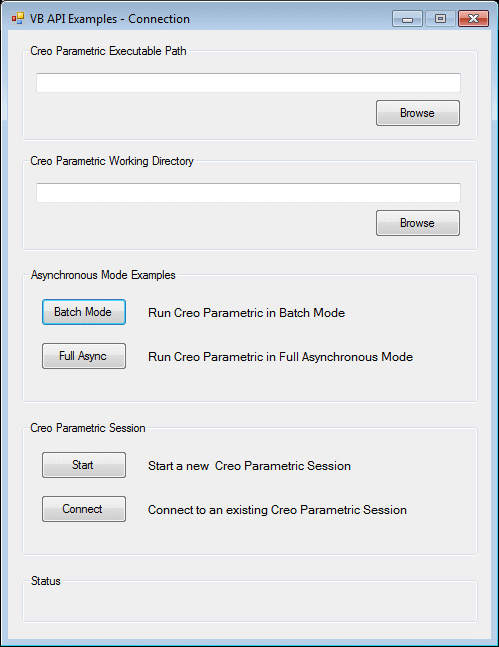
6. Click Start to start a new Creo Parametric session in the simple asynchronous mode. You must specify the Creo Parametric working directory and executable path before attempting to start a new session. You can also connect to an existing session in the simple asynchronous mode by clicking Connect. Click Batch Mode to start a new Creo Parametric session in the batch mode, or click Full Async to start a new Creo Parametric session in the full asynchronous mode. Refer to the section Asynchronous ModeVB API Fundamentals:Controlling Creo Parametric for more information on the modes of communication.
7. Once you are connected to a Creo Parametric session, the VB API Examples form is loaded. You can execute all the examples available in the vbapi_examples directory from this form.