Tool Motion — Go Delta
The PRO_E_TOOL_MTN element is a member of PRO_E_TOOL_MTN_ARR array and is documented in the header file ProMfgElemToolMtnGoDelta.h, and is shown in the following figure.
Figure 187. Element tree for PRO_E_TOOL_MTN element
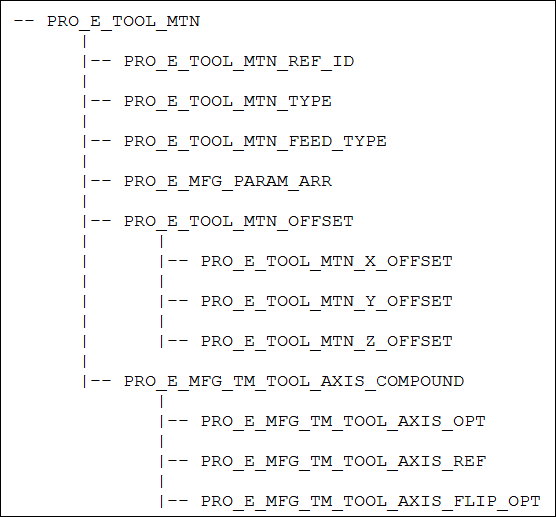
The following table lists the contents of PRO_E_TOOL_MTN element.
Element ID | Data Type | Description | ||
|---|---|---|---|---|
PRO_E_TOOL_MTN_TYPE | PRO_VALUE_TYPE_INT | Mandatory element. Species the Tool motion type . The valid value for this element is TPRO_TM_TYPE_GO_DELTA. The value for this element is defined by ProTmType. | ||
PRO_E_TOOL_MTN_FEED_TYPE | PRO_VALUE_TYPE_INT | Optional element. Specifies the type of feed for the tool motion using the enumerated data type ProToolMtnFeedType. The valid value for this element are: • PRO_TM_FEED_FREE—Specifies a free feed type. Free feed specifies the rate at which the tool moves in the transverse motion, that is, the non-cutting motion. • PRO_TM_FEED_CUT—Specifies a cut feed type. Cut feed specifies the rate at which the tool moves into the workpiece. • PRO_TM_FEED_PLUNGE—Specifies a plunge feed type. Plunge feed specifies the rate at which the tool approaches and plunges into the workpiece. • PRO_TM_FEED_RETRACT—Specifies a retract feed type. Retract feed specifies the rate at which the tool moves away from the workpiece. • PRO_TM_FEED_APPROACH—Specifies an approach feed type. Approach feed specifies the rate at which the tool approaches the workpiece. • PRO_TM_FEED_EXIT—Specifies an exit feed type. Exit feed specifies the rate at which the tool leaves the workpiece. • PRO_TM_FEED_THREAD—Specifies a thread feed type. Thread feed specifies the feed rate for the tapping step. | ||
PRO_E_MFG_PARAM_ARR | Array | Mandatory element. Specifies an array of manufacturing parameters. See the Creo NC online help for more information on manufacturing parameters. The element tree for the manufacturing parameter is defined in the header file ProMfgElemParam.h. For more information, refer to the section Manufacturing Parameters for more information on the element tree. | ||
PRO_E_TOOL_MTN_OFFSET | Compound | Optional element. This compound element specifies the offset value.
| ||
PRO_E_TOOL_MTN_X_OFFSET | PRO_VALUE_TYPE_DOUBLE | Optional element. Specifies the offset along X-axis. This element can range from negative to positive values. The valid range values for this element are from -MAX_DIM_VALUE to MAX_DIM_VALUE. | ||
PRO_E_TOOL_MTN_Y_OFFSET | PRO_VALUE_TYPE_DOUBLE | Optional element. Specifies the offset along Y-axis. This element can range from negative to positive values. The valid range values for this element are from -MAX_DIM_VALUE to MAX_DIM_VALUE. | ||
PRO_E_TOOL_MTN_Z_OFFSET | PRO_VALUE_TYPE_DOUBLE | Optional element. Specifies the offset along Z-axis. This element can range from negative to positive values. The valid range values for this element are from -MAX_DIM_VALUE to MAX_DIM_VALUE | ||
PRO_E_MFG_TM_TOOL_AXIS_COMPOUND | Compound | Optional element. This compound element specifies the tool axis. | ||
PRO_E_MFG_TM_TOOL_AXIS_OPT | PRO_VALUE_TYPE_INT | Optional element. This element specifies the tool axis options. The valid values for this element are: • PRO_TM_ALONG_Z • PRO_TM_USE_PREV • PRO_TM_AXIS_SEL | ||
PRO_E_MFG_TM_TOOL_AXIS_REF | PRO_VALUE_TYPE_SELECTION | This element specifies the axis selection.
| ||
PRO_E_MFG_TM_TOOL_AXIS_FLIP_OPT | PRO_VALUE_TYPE_INT | Specifies the flip options. The valid values for this element are: • TRUE • FALSE
|