Tool Motion — Follow Cut
The compound element PRO_E_TOOL_MTN is a member of PRO_E_TOOL_MTN_ARR array and is documented in the header file ProMfgElemToolMtnFollowCut.h. The Follow Cut tool Motion follows the following types of tool motions in an array:
• PRO_TM_TYPE_CURVE_TRAJECTORY
• PRO_TM_TYPE_AREA_TURNING
• PRO_TM_TYPE_GROOVE_TURNING
• PRO_TM_TYPE_PROF_TURNING
• PRO_TM_TYPE_SURF_TRAJECTORY
• PRO_TM_TYPE_EDGE_TRAJECTORY
Figure 211. Element tree for PRO_E_TOOL_MTN element
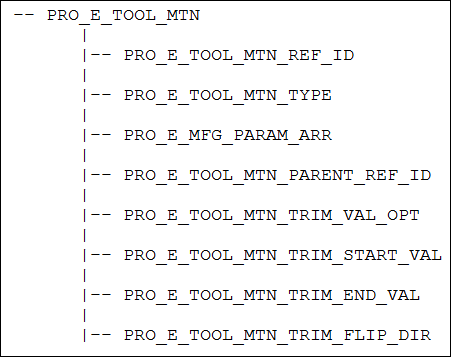
The following table lists the contents of PRO_E_TOOL_MTN element.
Element ID | Data Type | Description | ||
|---|---|---|---|---|
PRO_E_TOOL_MTN_TYPE | PRO_VALUE_TYPE_INT | Mandatory element. Specifies the tool motion type. The valid value for this element is PRO_TM_TYPE_TRIM. The value for this element is defined by ProTmType. | ||
PRO_E_MFG_PARAM_ARR | Array | Specifies an array of manufacturing parameters. See the Creo NC help for more information on manufacturing parameters. The element tree for the manufacturing parameter is defined in the header file ProMfgElemParam.h. For more information, refer to the section Manufacturing Parameters for more information on the element tree. | ||
PRO_E_TOOL_MTN_TRIM_VAL_OPT | PRO_VALUE_TYPE_INT | Mandatory element. Specifies the value options. The valid values for this element are: • PRO_TM_TRIM_VAL_PARAM—The input value is a ratio parameter. • PRO_TM_TRIM_VAL_DIST—The input value is a distance. | ||
PRO_E_TOOL_MTN_TRIM_START_VAL | PRO_VALUE_TYPE_DOUBLE | Mandatory element. Specifies the start parameter on tool path. The range specifies by this element is from [0., 1.]. | ||
PRO_E_TOOL_MTN_TRIM_END_VAL | PRO_VALUE_TYPE_DOUBLE | Mandatory element. Specifies the end parameter on tool path. The range specifies by this element is from [0., 1.].
| ||
PRO_E_TOOL_MTN_TRIM_FLIP_DIR | PRO_VALUE_TYPE_INT | Mandatory element. Specifies the direction of the tool motion. The valid values for this element are: • PRO_B_TRUE—Specifies reversed direction. • PRO_B_FALSE—Specifies same direction. |