Tangency Propagation
This section describes how to construct and access the elements for propagating tangency in a flexible modeling feature.
Introduction
When geometry is modified with Move, Offset, or Modify Analytic command, you can maintain the tangency between the modified geometry and the neighboring geometry. To maintain the tangency, the neighboring geometry may be modified, though it was not selected for modification. The geometry that is included during tangency propagation is defined as dragged geometry. The dragged geometry is modified in such a way that it always remains tangential to the directly modified geometry. The tangency propagation stops when the application recognizes a surface that is round or chamfer. The chamfer or round surface, except variable rounds, is recreated after the geometry is modified. The round and chamfer geometry are called connecting geometry.
Depending on the type of round surface, the tangency may or may not be propagated. The rounds are of the following types:
• Rounds that can be propagated. Tangency propagation can be forced to be carried through and continue onto adjacent tangent geometry.
• Rounds that cannot be propagated. The tangency stops and cannot be forced to go further.
• Rounds that cannot be recreated. These are mainly the variable rounds. Variable rounds can be removed but cannot be recreated.
• Interfering rounds. These are rounds that do not connect transformed or dragged geometry to the rest of the model but have to be removed and recreated to accommodate the changes in the transformed geometry, dragged geometry, and other rounds.
The round or chamfer surfaces connect the directly modified geometry and the dragged surfaces to the background geometry. The background geometry is the base geometry that is not modified.
The modified, dragged, connecting, fixed, and background geometry are displayed in different colors during modification in the user interface as shown in the figure below:
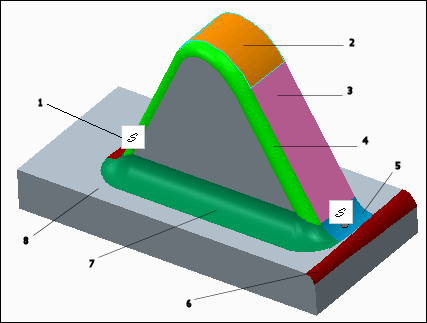
1—Default vertices are automatically created when you propagate tangency
2—Directly modified geometry
3—Dragged geometry
4—Rounds that cannot propagated
5—Rounds that can be propagated
6—Rounds that cannot be recreated
7—Interfering rounds
8—Background geometry
You can control the changes in geometry during tangency propagation by specifying the tangency constraints. During tangency propagation the fixed vertex constraints are also considered. The tangency constraint is applied on a reference geometry that can either be the dragged geometry or the connecting geometry, or both. Refer to Help for more information.
To work with tangency propagation, you must set the value of the element PRO_E_FLEX_PROPAGATE_TANGENCY to PRO_FLEXMODEL_OPT_YES. The element is defined in the header file ProFlxmdlOpts.h.
The element PRO_E_FLXSLV_PROP_CONSTRS is used to set the conditions that controls the changes in geometry during tangency propagation. It is seen in the following feature types:
• PRO_FEAT_FLEXMOVE (See ProFlexMove.h)
• PRO_FEAT_FLX_OGF (See ProFlexOffset.h)
• PRO_FEAT_ANALYT_GEOM (See ProFlexMag.h)