Introduction
This section describes the functions that enable you to create animation frames and movies.
provides the functions that enable you to animate parts and assemblies. handles lower-level considerations, such as hardware-dependent graphics and the user interface.
Two animation techniques are available:
• Batch animation—You create an animation movie (ProAnimMovie object) and users control the movie using an interface similar to a VCR. Users can perform such operations as “Play”, “Fast-Forward”, “Rewind”, and so on. The following figure shows the animation dialog box.
Figure 10. Animation Dialog Box
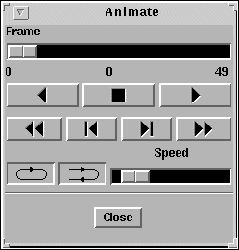
• Frame-by-frame (single) animation—You create a single animation (ProSingleAnim object) and code the control loop into your application. The batch animation interface does not appear. To replay the movie, you must reexecute the control loop of your application.
For both batch and single animation, you must build the animation from two important elements. These elements are:
• Animation object (ProAnimObj object)—Contains the object to be animated and its transformation, with respect to its immediate parent. In constructing the animation, you can show motion by creating a series of ProAnimObj objects, each with a different transformation.
• Animation frame (ProAnimFrame object)—Captures the image of the animation objects at one instance of the animation. Your final animation is a series of animation frames shown in succession.