Manufacturing Holemaking Step
The element tree for PRO_E_FEATURE_TREE is documented in the header file ProMfgFeatHolemaking.h, and is shown in the following figure.
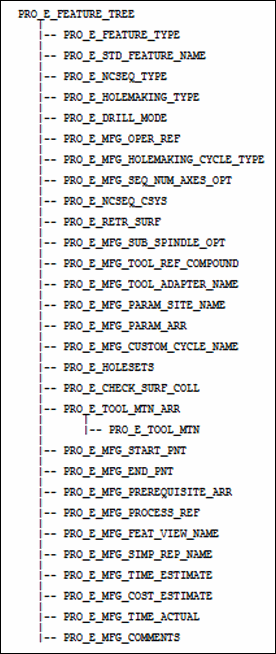
The following table lists the contents of PRO_E_FEATURE_TREE element.
Element ID | Data Type | Description | ||
|---|---|---|---|---|
PRO_E_FEATURE_TYPE | PRO_VALUE_TYPE_INT | Mandatory element. Specifies the type of the feature. The valid value for this element is PRO_FEAT_DRILL. | ||
PRO_E_STD_FEATURE_NAME | PRO_VALUE_TYPE_WSTRING | Optional element. Specifies the sequence feature name. | ||
PRO_E_SEQ_TYPE | PRO_VALUE_TYPE_INT | Mandatory element. Specifies the sequence type. The valid value for this element is PRO_SEQ_HOLEMAKING. | ||
PRO_E_HOLEMAKING_TYPE | PRO_VALUE_TYPE_INT | Mandatory element. Specifies the type of holemaking sequence using the enumerated value ProHolemakingType. | ||
PRO_E_DRILL_MODE | PRO_VALUE_TYPE_INT | Specifies the holemaking mode - machining with rotating part or rotating tool using the enumerated value ProDrillModeOption.
| ||
PRO_E_MFG_OPER_REF | PRO_VALUE_TYPE_SELECTION | Mandatory element. Specifies the operation feature selection. | ||
PRO_E_MFG_HOLEMAKING_CYCLE_TYPE | PRO_VALUE_TYPE_INT | Specifies the holemaking cycle type using the enumerated value ProHmCycleType.
| ||
PRO_E_MFG_SEQ_NUM_AXES_OPT | PRO_VALUE_TYPE_INT | Specifies the number of axes. The valid value for this element are: • 3 • 5
| ||
PRO_E_NCSEQ_CSYS | PRO_VALUE_TYPE_SELECTION | Mandatory element. Specifies the coordinate system datum feature to be used as a sequence coordinate system. | ||
PRO_E_RETR_SURF | Compound | Specifies the retract compound definition. For more information, refer to the section Retract Elements for more information on the element tree.
| ||
PRO_E_MFG_SUB_SPINDLE_OPT | PRO_VALUE_TYPE_INT | Optional Element. Specifies the type of spindle assigned to the sequence. This element can be used when two parts are machined during the same operation in different spindles, that is in the main spindle and in the sub spindle. The valid values for this element are defined by the enumerated type ProSubSpindleOpt. For more information on the values of ProSubSpindleOpt, refer to the section Spindle Types. | ||
PRO_E_MFG_TOOL_REF_COMPOUND | Compound | Specifies the tool reference compound definition. For more information, refer to the section Tool Reference for more information on the element tree. | ||
PRO_E_MFG_TOOL_ADAPTER_NAME | PRO_VALUE_TYPE_WSTRING | Optional element. Specifies the tool adapter model name. | ||
PRO_E_MFG_PARAM_SITE_NAME | PRO_VALUE_TYPE_WSTRING | Optional element. Specifies the name of site with default values for manufacturing parameters.
| ||
PRO_E_MFG_PARAM_ARR | Array | Mandatory element. Specifies an array of manufacturing parameters. The element tree for the manufacturing parameter is defined in the header file ProMfgElemParam.h. For more information, refer to the section Manufacturing Parameters for more information on the element tree. | ||
PRO_E_MFG_CUSTOM_CYCLE_NAME | PRO_VALUE_TYPE_WSTRING | Specifies the name of custom cycle which will be used to define machining strategy.
| ||
PRO_E_HOLESETS | Array | Specifies an array of holesets which gives specification of holes to machine. For more information, refer to the section Manufacturing Holemaking Holeset for more information on the element tree. | ||
PRO_E_CHECK_SURF_COLL | PRO_VALUE_TYPE_SELECTION | Specifies the check surfaces compound definition. The element tree for the Checking Surfaces is defined in the header file ProMfgElemCheckSurf.h. For more information, refer to the section Checking Surfaces for more information on the element tree. | ||
PRO_E_TOOL_MTN_ARR | Array | Optional element. Specifies an array of tool motions. | ||
PRO_E_TOOL_MTN | Compound | Optional element. Specifies the tool motion compound specification. The applicable tool motion types for this element are: | ||
PRO_E_MFG_START_PNT | PRO_VALUE_TYPE_SELECTION | Optional element. Specifies the datum point selection. Allows to start machining at the specified position. | ||
PRO_E_MFG_END_PNT | PRO_VALUE_TYPE_SELECTION | Optional element. Specifies the datum point selection. Allows to end machining at the specified position. | ||
PRO_E_MFG_PREREQUISITE_ARR | Array | Optional element. Specifies the array of ids of prerequisite sequences. The element tree for the Sequence Prerequisites is defined in the header file ProMfgElemPrerequisite.h. For more information, refer to the section Sequence Prerequisites for more information on the element tree. | ||
PRO_E_MFG_PROCESS_REF | PRO_VALUE_TYPE_SELECTION | Optional element. Specifies the reference selections such as part, feature, curve, surface, datum plane, axis, point, and datum coordinate. It allows you to create additional geometry references to be used only in special process application. This element supports multiple selections. | ||
PRO_E_MFG_FEAT_VIEW_NAME | PRO_VALUE_TYPE_WSTRING | Optional element. Specifies the view name. It allows you to associate specific view with a machining step.
| ||
PRO_E_MFG_SIMP_REP_NAME | PRO_VALUE_TYPE_WSTRING | Optional element. Specifies the simplified representation name. It allows you to associate a specific simplified representation with a machining step.
| ||
PRO_E_MFG_TIME_ESTIMATE | PRO_VALUE_TYPE_DOUBLE | Optional element. Specifies the time estimate. It allows you to specify time estimate for the machining step.
| ||
PRO_E_MFG_COST_ESTIMATE | PRO_VALUE_TYPE_DOUBLE | Optional element. Specifies the cost estimate. It allows you to specify cost estimate for the machining step.
| ||
PRO_E_MFG_TIME_ACTUAL | PRO_VALUE_TYPE_DOUBLE | Optional element. Specifies the actual time. It allows you to specify actual time for the machining step
| ||
PRO_E_MFG_COMMENTS | PRO_VALUE_TYPE_WSTRING | Specifies the sequence comments. |