Creating Workcells
The element tree for workcells is described in the include file ProWcell.h. For this feature, the feature type element is PRO_FEAT_WORKCELL.
The following table shows the required and optional elements for workcell features. In this table, the “Value” column specifies whether the element is required (R) or optional (O).
|
Element
|
Description
|
Value
|
|---|---|---|
|
Cell type
|
Mill, mill/turn, and so on.
|
R
|
|
Number of axes
|
The number of axes.
|
R
|
|
Table direction
|
Horizontal or vertical (for turn or mill/turn)
|
R
|
|
Machine number heads
|
1 or 2 (for turn or mill/turn)
|
R
|
|
Name
|
The workcell name.
|
O
|
|
Tooling
|
Add tools to the workcell.
|
O
|
|
Tool table
|
Manipulate the tools in a tool table.
|
O
|
|
Parameters
|
The workcell parameters.
|
O
|
The feature element has two complex elements—PRO_E_MFG_PARAMS, described in the section Manufacturing Parameters, and PRO_E_TOOL_TABLE. The following figure shows how the tool table element is constructed.
Figure 141. Tool Table Element
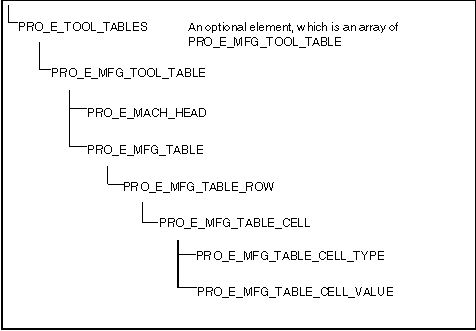
The first thing to note is that a workcell can have multiple tool tables, if it has more than one machine head. In this case, you can create a tool table for each head.
A manufacturing table is made up of an array of PRO_E_MFG_TABLE_ROW elements, which is itself an array of PRO_E_MFG_TABLE_CELL elements. Each PRO_E_MFG_TABLE_CELL is a compound element that contains two more elements—the cell type and its value.
The following examples show how to create a tool table with five drill bits, ranging in size from M8 to M16. The tool table for most workcells (excluding CMM) is of the following format:
POSITION TOOL_ID REGISTER COMMENTS
1 drill_M8 8MM Drill
2 drill_M10 10MM Drill
1 drill_M8 8MM Drill
2 drill_M10 10MM Drill
For example, to create the first row of the table, you would define the following PRO_E_MFG_TABLE_CELLs:
• To define the first cell so the position of the tool is index 1, set the value of the PRO_E_MFG_TABLE_CELL_TYPE to PRO_TOOL_TABLE_INDEX, and set the value of PRO_E_MFG_TABLE_CELL_VALUE to the integer value 1.
• Similarly, define the tool identifier to be a drill_M8. Set the cell type element to PRO_TOOL_TABLE_TOOL_ID, and set the value to a wide string of value drill_M8. Because the register column is empty, it can be ignored. To set the comments element, set the type to PRO_TOOL_TABLE_COMMENTS, and set the value to a wide string of value “8MM Drill.”
Parent topic