Editing Bend Reliefs
The Edit Bend Relief feature enables you to edit bend reliefs in existing bends.
The element tree for the Edit Bend Relief feature is documented in the header file ProSmtEditBendRelief.h and is shown in the following figure:
Figure 130. Feature Element Tree for Edit Bend Relief Feature
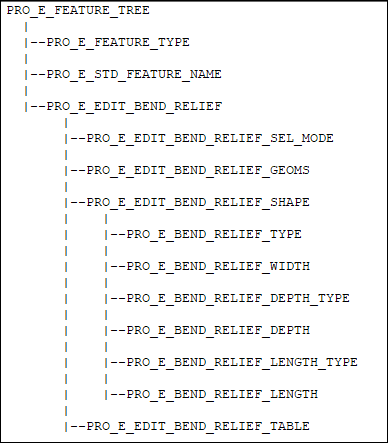
The elements in this tree are described as follows:
Element ID | Data Type | Description |
|---|---|---|
PRO_E_FEATURE_TYPE | PRO_VALUE_TYPE_INT | Mandatory element. Specifies the type of feature. The value of this feature must be PRO_FEAT_EDIT_BEND_RELIEF. |
PRO_E_STD_FEATURE_NAME | PRO_VALUE_TYPE_WSTRING | Mandatory element. Specifies the name of the feature. The default value is EDIT_BEND_RELIEF_1. |
PPRO_E_EDIT_BEND_RELIEF | Compound | Mandatory element. This compound element defines the options and sets the values for editing a bend relief. |
PRO_E_EDIT_BEND_RELIEF_SEL_MODE | PRO_VALUE_TYPE_INT | Mandatory element. Specifies the mode for selecting bend reliefs. The valid values are: • PRO_SMT_RECOGNITION_MANUAL_SEL—Specifies manual selection of bend reliefs to edit. • PRO_SMT_RECOGNITION_AUTO_SEL—Specifies automatic selection of bend reliefs to edit. |
PRO_E_EDIT_BEND_RELIEF_GEOMS | Multi Collector | This element is mandatory when the selection mode is set to PRO_SMT_RECOGNITION_MANUAL_SEL. Specifies the selection of geometry for bend reliefs. You can select valid bend relief design objects, geometry of recognizable bend reliefs, or surfaces of bends for which bend reliefs can be edited. You can also select planes with adjacent bends. If an intent surface is selected, all the surfaces which are not relevant will be ignored. Thickness edges can be selected when side surfaces cannot be selected. Bend relief vertices can be selected when neither side surfaces nor thickness edges can be selected. |
PRO_E_EDIT_BEND_RELIEF_SHAPE | Compound | Mandatory element. This compound element specifies the options that define the shape of a bend relief. |
PRO_E_BEND_RELIEF_TYPE | PRO_VALUE_TYPE_INT | Mandatory element. Specifies the type of bend relief. The valid values are: • PRO_BEND_RLF_RIP—The selected bend reliefs are edited to rip reliefs with no dimensions. • PRO_BEND_RLF_RECTANGULAR—The selected bend reliefs are edited to rectangular reliefs with width and depth dimensions. • PRO_BEND_RLF_OBROUND—The bend relief is edited to an obround relief with width and depth dimensions. |
PRO_E_BEND_RELIEF_WIDTH | PRO_VALUE_TYPE_DOUBLE | This element is mandatory when the element PRO_E_BEND_RELIEF_TYPE is set to PRO_BEND_RLF_RECTANGULAR or PRO_BEND_RLF_OBROUND. Specifies the value for width in a bend relief. |
PRO_E_BEND_RELIEF_DEPTH_TYPE | PRO_VALUE_TYPE_INT | This element is mandatory when the element PRO_E_BEND_RELIEF_TYPE is set to PRO_BEND_RLF_RECTANGULAR or PRO_BEND_RLF_OBROUND. Specifies the type of depth for bend relief. The valid values are: • PRO_BEND_RLF_DEPTH_BLIND—Creates a relief through the geometry as per the specified value. • PRO_BEND_RLF_DEPTH_UP_TO_BEND— Creates a relief up to the bend. • PRO_BEND_RLF_DEPTH_TAN_TO_BEND—This depth type is applicable only for bend relief type PRO_BEND_RLF_OBROUND. Creates a relief tangential to the bend. |
PRO_E_BEND_RELIEF_DEPTH | PRO_VALUE_TYPE_DOUBLE | This element is mandatory when the element PRO_E_BEND_RELIEF_DEPTH_TYPE is set to PRO_BEND_RLF_DEPTH_BLIND. Specifies the value for depth in a bend relief. The depth is measured from the edge of the bend. |
PRO_E_BEND_RELIEF_LENGTH_TYPE | PRO_VALUE_TYPE_INT | This element is mandatory and it specifies the type of the relief length. It is defined by the enumerated data type ProBendRlfLengthType and the valid values follow: • PRO_BEND_RLF_LENGTH_NOT_USED • PRO_BEND_RLF_LENGTH_BLIND—Creates the bend reliefs with a length of the specified value. • PRO_BEND_RLF_LENGTH_TO_NEXT—Creates the bend reliefs with a length to the next surface. • PRO_BEND_RLF_LENGTH_THROUGH_ALL—Creates the bend reliefs through all surfaces. • PRO_BEND_RLF_LENGTH_TYPE_PARAM—Uses the SMT_DFLT_BEND_REL_LENGTH_TYPE parameter value. |
PRO_E_BEND_RELIEF_LENGTH | PRO_VALUE_TYPE_DOUBLE | Specifies the value of the relief length. This element is mandatory when the length type is PRO_BEND_RLF_LENGTH_BLIND. Only zero or positive values are allowed |
PRO_E_EDIT_BEND_RELIEF_TABLE | Array | This element along with its child elements is reserved for internal use. |