Manufacturing Parameters
In general, there are a number of parameters that are mandatory for a given tool type or NC sequence, and others that are optional. For example, a milling tool requires that its length and diameter be specified, while other parameters such as the number of teeth, or tool material are optional.
The addition of manufacturing parameters to both workcells and operations is optional.
The following figure shows a parameter element subtree.
Figure 140. Parameter Element Subtree
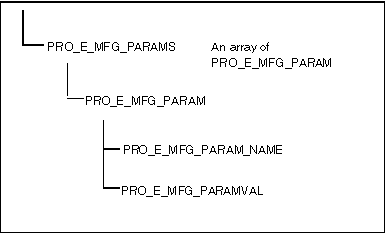
The process of creating a parameter element subtree is the same for workcells, operations, and NC sequences. First, allocate the space for the PRO_E_MFG_PARAMS array element. The simplest method of creating the tree is to delay adding the PRO_E_MFG_PARAMS element to its parent until you have fully defined the tree. As you define each PRO_E_MFG_PARAM element, add it to the PRO_E_MFG_PARAMS array using ProElemtreeElementAdd(). Use NULL for the element path as each PRO_E_MFG_PARAM element is added to the parameter element tree.
The PRO_E_MFG_PARAM element itself is a compound element and requires two children to be defined. One is the PRO_E_MFG_PARAM_NAME element, a string (not a wide string) that represents the parameter name to define. The other is a PRO_E_MFG_PARAMVAL element, which represents the value of the parameter. Depending on the context, this might be an integer, double, or wide string. For example, CUT_FEED is represented by a double, whereas NUMBER_OF_ARC_PNTS is an integer. Refer to the NC Manufacturing Help for more information on manufacturing parameters.
Example 4: Creating a Parameter Tree
The sample code in UgMfgParamTreeCreate.c located at <creo_toolkit_loadpoint>/protk_appls/pt_userguide/ptu_mfg shows how to create a parameter element tree.
Parent topic