Creating Operations
The element tree for manufacturing operations is described in the header file ProMfgoper.h. For this feature, the feature type element is PRO_FEAT_WORKCELL.
The following table shows the elements of a manufacturing operation. In this table, the “Value” column specifies whether the element is required (R) or optional (O).
|
Element
|
Description
|
Value
|
|---|---|---|
|
Workcell
|
The identifier of the workcell feature in which to perform the operation
|
R
|
|
Machine coordinate system
|
The identifier of the machining coordinate system
|
R
|
|
Name
|
The operation name
|
O
|
|
Comments
|
The operation comments
|
O
|
|
From point
|
The datum point from which to start the operation
|
O
|
|
Home point
|
The datum point on which to end the operation
|
O
|
|
Parameters
|
The operation parameters
|
O
|
The creation of the feature tree is simple, apart from the home and point elements. The following figure shows the element tree for the home points.
Figure 142. Home Point Element Tree
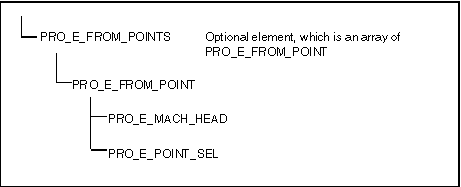
In this example, there is a from and home point defined for each machining head. If there is only one head, the value of the PRO_E_MACH_HEAD element should be 1. Note that the PRO_E_POINT_SEL selection should be initialized not to the datum point feature, but to the datum point geometry. To find this geometry, call the function ProFeatureGeomitemVisit()).
Example 6: Creating an Operation
The sample code in UgMfgOperCreate.c located at <creo_toolkit_loadpoint>/protk_appls/pt_userguide/ptu_mfg shows how to create an operation.
Parent topic