Introduction
Creo Simulate Geometry differs from that of standard Creo Parametric geometry in several ways.
• Creo Simulate geometry provides a non-manifold representation of assembly models.
Figure 219. Non-manifold geometry
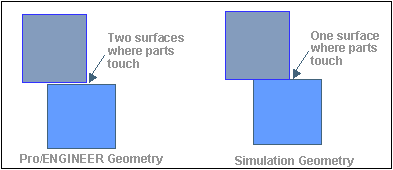
In assemblies, when two parts are mated, there exist two surfaces where the parts are mated, each of which does not know the existence of the other.
For analysis applications (particularly in meshing), you want the geometry to have only one surface in this mated area
• Creo Simulate geometry provides mid-surface geometry for models which have shells defined.
Figure 220. Mid-surface geometry

• Creo Simulate geometry provides volume and surface region information.
Figure 221. “Tagged” region
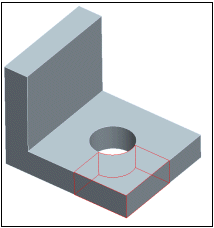
Without access to the Creo Simulate geometry, it is difficult to use the information on volume and surface region.
The Creo Simulate geometry identifies which surfaces are "duplicated" at the boundaries within the solid. This makes it easy for external applications to re-create the non-manifold solid.
• Creo Simulate Geometry model is devoid of the undesirable features (from the point of view of analysis) present in the Creo Parametric model such as
◦ Small, localized misalignments in the geometry
◦ Cusps
◦ Very small sliver surfaces