Driving Surface Feature
The Driving Surface feature converts a solid geometry to sheet metal part. For thin protrusions with constant thickness, use the Driving Surface feature to select a surface as the driving surface and to set the wall thickness.
The element tree for the Driving Surface feature is documented in the header file ProSmtDrvSurf.h and is shown in the following figure:
Figure 119. Element Tree for Driving Surface Feature
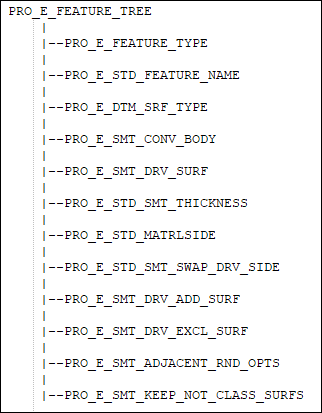
The elements in this tree are described as follows:
Element ID | Data Type | Description |
|---|---|---|
PRO_E_FEATURE_TYPE | PRO_VALUE_TYPE_INT | Specifies the type of feature. The value of this feature must be PRO_FEAT_DATUM_SURF. |
PRO_E_STD_FEATURE_NAME | PRO_VALUE_TYPE_WSTRING | Specifies the name of the feature. The default value is Driving_Surface_1. |
PRO_E_DTM_SRF_TYPE | PRO_VALUE_TYPE_INT | Specifies the Datum Surface Type using the enumerated type ProSmtDtmSrfType. The value of this feature must be PRO_DTM_SRF_AS_WALL. For an empty body, the value of this feature must be PRO_DTM_SRF_EMPTY_BODY_CONV. |
PRO_E_SMT_CONV_BODY | PRO_VALUE_TYPE_SELECTION | Specifies the body to be selected to be converted to a sheet metal part. |
PRO_E_SMT_DRV_SURF | PRO_VALUE_TYPE_SELECTION | Specifies the collection of a solid surface to be used as the driving surface. |
PRO_E_STD_SMT_THICKNESS | PRO_ELEM_TYPE_DOUBLE | Specifies the thickness of the wall. |
PRO_E_STD_MATRLSIDE | PRO_VALUE_TYPE_INT | Specifies the direction of material thickness. |
PRO_E_STD_SMT_SWAP_DRV_SIDE | PRO_VALUE_TYPE_INT | Specifies sheet metal swap sides to switch sides of driving and selected surfaces. |
PRO_E_SMT_DRV_ADD_SURF | Compound | Specifies the additional surface to be used as a driving surface for the sheet metal body part. |
PRO_E_SMT_DRV_EXCL_SURF | Compound | Specifies the surfaces to be excluded so that they are not treated as face surfaces in the sheet metal body. |
PRO_E_SMT_ADJACENT_RND_OPTS | PRO_VALUE_TYPE_INT | Specifies the adjacent round options and is defined by the enumerated date type ProSmtAdjRndOpts. The valid values follow: • PRO_SMT_ADJ_RND_RECREATE—Removes rounds and chamfers and recreates them after the part is converted to a sheet metal part. • PRO_SMT_ADJ_RND_REMOVE—Removes the rounded geometry. The resulting geometry is similar to the geometry before the round operation. • PRO_SMT_ADJ_RND_IGNORE—Ignores the rounded geometry. The resulting geometry is without the rounded geometry. |
PRO_E_SMT_KEEP_NOT_CLASS_SURFS | PRO_VALUE_TYPE_INT | Specifies the keep not classified surfaces and is defined by the enumerated data type ProSmtKeepNotClassSurfsType. The valid values follow: • PRO_SMT_IGNORE_NOT_CLASS_SURFS —Ignores surfaces that are not classified as the driving surface, additional surfaces, and excluded surfaces as separate quilts. • PRO_SMT_KEEP_NOT_CLASS_SURFS—Keeps surfaces that are not classified as the driving surface, additional surfaces, and excluded surfaces as separate quilts. |