Shell Feature
You can use the convert features to convert a solid part into a sheet metal part. For a block-like part, use the Shell feature to remove one or more walls that hollows the inside of the model, leaving a shell of the specified wall thickness.
The element tree for the Shell feature is documented in the header file ProSmtShell.h, and is shown in the following figure:
Figure 118. Element Tree for Shell Feature
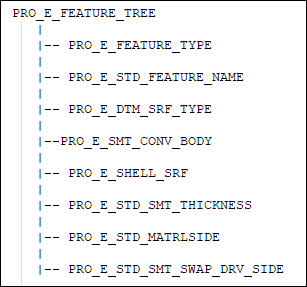
The elements in this tree are described as follows:
Element ID | Data Type | Description |
|---|---|---|
PRO_E_FEATURE_TYPE | PRO_VALUE_TYPE_INT | Specifies the type of feature. The value of this feature must be PRO_FEAT_DATUM_SURF. |
PRO_E_STD_FEATURE_NAME | PRO_VALUE_TYPE_WSTRING | Specifies the name of the feature. The default value is Shell_1. |
PRO_E_DTM_SRF_TYPE | PRO_VALUE_TYPE_INT | Specifies the Datum Surface Type using the enumerated type ProSmtDtmSrfType. The value of this feature must be PRO_DTM_SRF_AS_WALL_SHELL. |
PRO_E_SMT_CONV_BODY | PRO_VALUE_TYPE_SELECTION | Specifies the body to be selected to convert to a sheet metal part. |
PRO_E_SHELL_SRF | PRO_VALUE_TYPE_SELECTION | Optional element. Specifies the collection of surfaces to be removed to shell the solid. |
PRO_E_STD_SMT_THICKNESS | PRO_ELEM_TYPE_DOUBLE | Specifies the thickness of the wall. It must be positive a number. |
PRO_E_STD_MATRLSIDE | PRO_VALUE_TYPE_INT | Specifies the direction of material thickness. |
PRO_E_STD_SMT_SWAP_DRV_SIDE | PRO_VALUE_TYPE_INT | Specifies sheet metal swap sides to switch sides of shelled and driving surfaces. |