Element Trees: Composite Drape
This section introduces and shows how to create, redefine and access drape feature in Creo TOOLKIT.
Introduction to Drape Feature
You can run the draping simulation to analyze the ply producibility and to create the ply flat patterns. You can create only one drape feature in a composite feature.
Feature Element Tree for the Drape Feature
The element tree for the Drape feature is documented in the header file ProCmpstDrape.h. The following figure demonstrates the element tree structure:
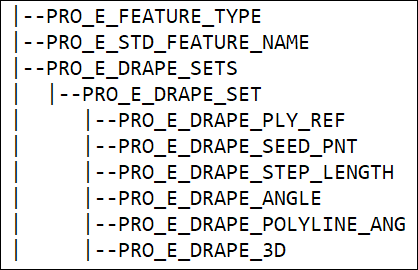
The following table describes the elements in the element tree:
Element ID | Element Name | Data Type |
PRO_E_FEATURE_TYPE | Feature Type | PRO_VALUE_TYPE_INT |
PRO_E_STD_FEATURE_NAME | featname | PRO_VALUE_TYPE_WSTRING |
PRO_E_DRAPE_SETS | Sets | Compound element ProArray |
PRO_E_DRAPE_SET | Set | Mandatory element |
PRO_E_DRAPE_PLY_REF | Ply Reference | Mandatory element ProReference |
PRO_E_DRAPE_SEED_PNT | Seed Point | Optional element ProReference |
PRO_E_DRAPE_STEP_LENGTH | Step length | Mandatory element PRO_VALUE_TYPE_DOUBLE |
PRO_E_DRAPE_ANGLE | Draping angle | PRO_VALUE_TYPE_DOUBLE |
PRO_E_DRAPE_POLYLINE_ANG | Simplification angle | PRO_VALUE_TYPE_DOUBLE |
PRO_E_DRAPE_3D | Drape in 3D space | ProDrapeIn3d |
PRO_E_DRAPE_REFINEMENT | Refinement | Mandatory element ProDrapeRefinement |
PRO_E_DRAPE_CURED_THICK | Drape all plies | ProDrapeThicknessOpt |
The elements in this tree are described as follows:
• PRO_E_FEATURE_TYPE—Specifies the feature type and the valid value is PRO_FEAT_CMPST_DRAPE.
• PRO_E_STD_FEATURE_NAME—Specifies the feature name.
• PRO_E_DRAPE_SETS—Specifies the ProArray of draping simulation definitions.
• PRO_E_DRAPE_SET—Specifies the draping simulation definition applied to a single ply.
• PRO_E_DRAPE_PLY_REF—Specifies the ply to perform a draping simulation on.
• PRO_E_DRAPE_SEED_PNT—Specifies the position on the mould surface or previous ply on which the drape starts (i.e. the first point of contact between the ply and previous ply or mould).
• PRO_E_DRAPE_STEP_LENGTH—Specifies the distance between adjacent drape points / fibers i.e. the resolution of the fishnet drape mesh.
• PRO_E_DRAPE_ANGLE—Specifies the angle with respect to the material roll direction of the fixed warp and weft fibers (i.e. the orientation that the drape progresses).
• PRO_E_DRAPE_POLYLINE_ANG—Specifies the angle between the polyline segments.
• PRO_E_DRAPE_3D—Specifies the height of the ply in the laminate stack when performing draping analysis. This element is defined using the enumerated data type ProDrapeIn3d and valid values are:
◦ PRO_DRAPE_IN3D_DISABLED—0.
◦ PRO_DRAPE_IN3D_ENABLED—1.
• PRO_E_DRAPE_REFINEMENT—Specifies the option for additional refinements by using the property parameters for the step length, drape angle offset, and simplification angle for each set. This element is defined using the enumerated data type ProDrapeRefinement and the valid values are:
◦ PRO_DRAPE_REFINEMENT_DISABLED—0
◦ PRO_DRAPE_REFINEMENT_ENABLED—1
• PRO_E_DRAPE_CURED_THICK—Specifies the option to drape the plies using cured or uncured thickness This element is defined using the enumerated data type ProDrapeThicknessOpt and the valid values are:
◦ PRO_DRAPE_OPTION_CURED_THICKNESS—0
◦ PRO_DRAPE_OPTION_UNCURED_THICKNESS—1