Element Tree: Manual Ply
This section introduces and shows how to create, redefine and access manual ply features in Creo TOOLKIT.
Introduction to Manual Ply
Create a manual ply by defining its material and properties. To create a manual ply, you must first set up the Composite Design environment.
Feature Element Tree for the Manual Ply Feature
The element tree for the Manual Ply feature is documented in the header file ProCmpstManPly.h. The following figure demonstrates the element tree structure:
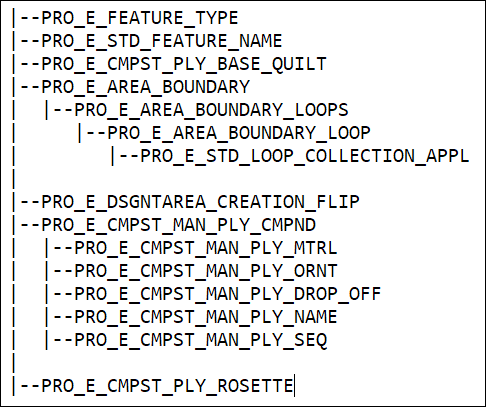
The following table describes the elements in the element tree:
Element ID | Element Name | Data Type |
|---|---|---|
PRO_E_FEATURE_TYPE | Feature Type | PRO_VALUE_TYPE_INT |
PRO_E_STD_FEATURE_NAME | featname | PRO_VALUE_TYPE_WSTRING |
PRO_E_CMPST_PLY_BASE_QUILT | layup surface | PRO_VALUE_TYPE_SELECTION |
PRO_E_CMPST_MAN_PLY_TYPE | Ply_type | Optional element |
PRO_E_AREA_BOUNDARY | Boundary | Compound element. |
PRO_E_AREA_BOUNDARY_LOOPS | Loops | ProArray of Loops |
PRO_E_AREA_BOUNDARY_LOOP | Loop | Compound element. |
PRO_E_STD_LOOP_COLLECTION_APPL | Boundary chains | PRO_VALUE_TYPE_POINTER |
PRO_E_DSGNTAREA_CREATION_FLIP | Creation Flip | PRO_VALUE_TYPE_INT |
PRO_E_CMPST_MAN_PLY_ZONES | Zones | PRO_VALUE_TYPE_SELECTION |
PRO_E_CMPST_MAN_PLY_CMPND | PlyCompound | Compound element. |
PRO_E_CMPST_MAN_PLY_MTRL | Material | PRO_VALUE_TYPE_INT |
PRO_E_CMPST_MAN_PLY_ORNT | Orientation | PRO_VALUE_TYPE_DOUBLE |
PRO_E_CMPST_MAN_PLY_DROP_OFF | Drop-Off | PRO_VALUE_TYPE_DOUBLE |
PRO_E_CMPST_MAN_PLY_NAME | Name | PRO_VALUE_TYPE_WSTRING |
PRO_E_CMPST_PLY_ROSETTE | CmpstPlyRosetteStep | PRO_VALUE_TYPE_SELECTION |
The elements in this tree are described as follows:
• PRO_E_FEATURE_TYPE—Specifies the feature type and the valid value is PRO_FEAT_CMPST_MAN_PLY.
• PRO_E_STD_FEATURE_NAME—Specifies the feature name.
• PRO_E_CMPST_PLY_BASE_QUILT—Specifies the selection of layup surfaces.
• PRO_E_CMPST_MAN_PLY_TYPE—Specifies the manual ply type. The ply type is defined using the enumerated data type ProCmpst_man_ply_type and has the valid values as:
◦ PRO_CMPST_MAN_PLY_TYPE_OPT_MANUAL_PLY—Use PRO_E_AREA_BOUNDARY to specify the boundary.
◦ PRO_CMPST_MAN_PLY_TYPE_OPT_ZONE_BASED_PLY—Use PRO_E_CMPST_MAN_PLY_ZONES to specify the boundary zones.
• PRO_E_AREA_BOUNDARY—Specifies the boundary.
• PRO_E_AREA_BOUNDARY_LOOPS—Specifies the loops that represent the outer boundary of the ply and its inner islands.
• PRO_E_AREA_BOUNDARY_LOOP—Specifies the loops from multiple edges, curves, or loops.
• PRO_E_STD_LOOP_COLLECTION_APPL—Specifies the boundary chains using the ProCrvcollection object.
• PRO_E_DSGNTAREA_CREATION_FLIP—Specifies the flip direction.
• PRO_E_CMPST_MAN_PLY_ZONES—Specifies the boundary zones. The valid value is PRO_QUILT for laminate zone feature.
• PRO_E_CMPST_MAN_PLY_CMPND
◦ PRO_E_CMPST_MAN_PLY_MTRL—Specifies the material of the ply.
◦ PRO_E_CMPST_MAN_PLY_ORNT—Specifies the angle of the ply with respect to X-axis of the rosette. The valid range is-360.0 to +360.0.
◦ PRO_E_CMPST_MAN_PLY_DROP_OFF—Specifies the drop-off. The valid range is 0 to MAX_DIM_VALUE.
◦ PRO_E_CMPST_MAN_PLY_NAME—Specifies the name of the ply object that is shown in the Laminate tree.
◦ PRO_E_CMPST_MAN_PLY_SEQ—Specifies the ply sequence.
• PRO_E_CMPST_PLY_ROSETTE—Specifies the selection of PRO_SURFACE, PRO_QUILT, PRO_CSYS, PRO_LOG_CSYS.