Twist Wall Feature
The twist wall feature enables you to create a spiral or coil-shaped section of sheet metal. The twist wall can be attached to a straight edge on an existing planar wall. The twist wall typically serves as a transition between two areas of sheet metal because it can change the plane of a sheet metal part. The twist can be rectangular or trapezoidal.
The element tree for the twist wall feature is documented in the header file ProSmtTwist.h and is shown in the following figure:
Figure 137. Element Tree for Twist Wall Feature
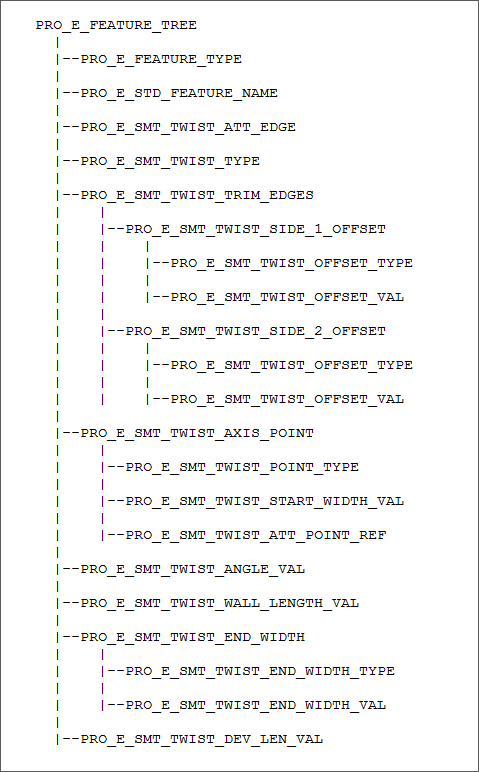
The following table describes the elements in the element tree for the twist wall feature.
Element ID | Data Type | Description |
|---|---|---|
PRO_E_FEATURE_TYPE | PRO_VALUE_TYPE_INT | Specifies the type of the sheet metal feature. The valid value for this element is PRO_FEAT_TWIST. |
PRO_E_STD_FEATURE_NAME | PRO_VALUE_TYPE_WSTRING | Specifies the name for the sheet metal feature. The default value is Twist_1. |
PRO_E_SMT_TWIST_ATT_EDGE | PRO_VALUE_TYPE_SELECTION | Specifies an edge to which the twist wall will be attached. |
PRO_E_SMT_TWIST_TYPE | PRO_VALUE_TYPE_INT | Specifies the width options for the walls. The valid values for this element are defined by the enumerated data type ProSmtTwistType and are as follows: • PRO_SMT_TWIST_TRIM_EDGES—Calculates the wall width from the ends of the attachment edges. The walls are offset by the specified value from the attachment ends. • PRO_SMT_TWIST_TYPE_PNT—Calculates and centers the wall width from the twist axis by the specified dimension. |
PRO_E_SMT_TWIST_TRIM_EDGES | Compound | Specifies a compound element which defines options for twist wall ends. This element is available when the value of the element PRO_E_SMT_TWIST_TYPE is set to PRO_SMT_TWIST_TRIM_EDGES. |
PRO_E_SMT_TWIST_SIDE_1_OFFSET PRO_E_SMT_TWIST_SIDE_2_OFFSET | Compound | Specifies the trim option and offset value for the first and second direction of wall ends. The elements PRO_E_SMT_TWIST_OFFSET_TYPE and PRO_E_SMT_TWIST_OFFSET_VAL are common to the compound elements in both directions. |
PRO_E_SMT_TWIST_OFFSET_TYPE | PRO_VALUE_TYPE_INT | Specifies the type of trim for the first and second direction using the enumerated data type ProSmtTwistOffsetType. The valid values are: • PRO_TWIST_OFFSET_TYPE_TO_END—Specifies that the ends of the twist wall are set at the end edges of the attachment points. • PRO_TWIST_OFFSET_TYPE_BLIND—Specifies that the wall ends should be trimmed or extended from the end edges of the attachment points in specified direction. |
PRO_E_SMT_TWIST_OFFSET_VAL | PRO_VALUE_TYPE_DOUBLE | Specifies the offset value. This element is applicable when the value of the element PRO_E_SMT_TWIST_OFFSET_TYPE is set to PRO_TWIST_OFFSET_TYPE_BLIND. |
PRO_E_SMT_TWIST_AXIS_POINT | Compound | Specifies a compound element which defines options for twist axis. This element is available when the value of the element PRO_E_SMT_TWIST_TYPE is set to PRO_SMT_TWIST_TYPE_PNT. |
PRO_E_SMT_TWIST_POINT_TYPE | PRO_VALUE_TYPE_INT | Specifies the location of the twist axis using the enumerated data type ProSmtTwistPointType. The valid values are: • PRO_SMT_TWIST_MID_PNT—Specifies that the twist axis is located at the center of the wall width. • PRO_SMT_TWIST_DTM_PNT—Specifies that the twist axis is located on the specified datum point. |
PRO_E_SMT_TWIST_START_WIDTH_VAL | PRO_VALUE_TYPE_DOUBLE | Specifies the width of the start wall. |
PRO_E_SMT_TWIST_ATT_POINT_REF | PRO_VALUE_TYPE_SELECTION | This element is available when the value of the element PRO_E_SMT_TWIST_POINT_TYPE is set to PRO_SMT_TWIST_DTM_PNT. Specifies a datum point on the attachment edge. The centerline of the twist wall passes through this datum point. The centerline of the twist axis is perpendicular to the start edge and coplanar with the existing wall. |
PRO_E_SMT_TWIST_ANGLE_VAL | PRO_VALUE_TYPE_DOUBLE | Specifies the rotation angle of the twist wall. |
PRO_E_SMT_TWIST_WALL_LENGTH_VAL | PRO_VALUE_TYPE_DOUBLE | Specifies the length of the twist wall, measured from the attachment edge to the end of the twist axis. |
PRO_E_SMT_TWIST_END_WIDTH | Compound | Specifies a compound which defines options to change the width of the end wall. |
PRO_E_SMT_TWIST_END_WIDTH_TYPE | PRO_VALUE_TYPE_INT | Specifies the width option for the end wall using the enumerated data type ProSmtTwistEndWidthType. The valid values are: • PRO_TWIST_END_WIDTH_SAME_AS_START—Specifies that the width of the end wall must be same as the start wall. • PRO_TWIST_END_WIDTH_BLIND—Specifies that the width of the end wall must be set to the specified value. |
PRO_E_SMT_TWIST_END_WIDTH_VAL | PRO_VALUE_TYPE_DOUBLE | Specifies the width of the end wall. |
PRO_E_SMT_TWIST_DEV_LEN_VAL | PRO_VALUE_TYPE_DOUBLE | Specifies the length of wall in unbent state. |