Point Patterns
A point pattern creates a pattern by placing a pattern member at a particular point.
The following figure shows the elements of a point pattern:
Figure 57. Element Tree for a Point Pattern
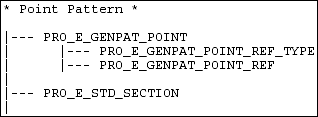
If the pattern type in the element tree is PRO_GENPAT_POINT_DRIVEN, the element tree must contain the information about the reference point and the actual point at which you want to draw the pattern.
Use the element PRO_E_GENPAT_POINT_REF_TYPE to select the type of the point at which you want to repeat the selected feature. This selected point is the reference point for creating the pattern. You can select a point from the following options:
• Internal or External sketch
• Datum point feature
After the type of the reference point is set, use the element PRO_E_GENPAT_POINT_REF to select the actual point.
The following table lists the contents of each PRO_E_GENPAT_POINT element.
Element ID Values | Element Name | Data Type | Valid Values |
|---|---|---|---|
PRO_E_GENPAT_POINT_REF_TYPE | Point type | PRO_VALUE_TYPE_INT | PRO_GENPAT_REF_SKETCH, PRO_GENPAT_REF_POINT |
PRO_E_GENPAT_POINT_REF | Point reference | PRO_VALUE_TYPE_SELECTION |