Dimension Entity Location
The following functions extract the locations of geometric endpoints for the dimension. You can calculate the dimension location plane, witness line, and dimension orientation vectors from these points. The location of the points is specified in the same coordinate system as the solid model.
Functions Introduced:
• ProDimlocationTextGet()
• ProDimlocationArrowsGet()
• ProDimlocationWitnesslinesGet()
• ProDimlocationArrowtypesGet()
• ProDimlocationCenterleadertypeGet()
• ProDimlocationZExtensionlinesGet()
• ProDimlocationNormalGet()
The function ProDimlocationTextGet() returns the location of the dimension text in model coordinates. If the dimension contains an elbow, the function returns the location of the elbow joint and the length of the elbow in model coordinates.
The function ProDimlocationArrowsGet() returns the location of the arrow heads for the dimension.
The function ProDimlocationWitnesslinesGet() returns the location of the witness line ends for the dimension.
The function ProDimlocationArrowtypesGet() returns the type of arrows used for the leader of a specified 3D dimension. The dimension location obtained using the function ProDimensionLocationGet() serves as an input argument for this function.
|
Note:
|
In case of radial dimensions where the arrow head type cannot be changed, the function ProDimlocationArrowtypesGet() always returns the “Arrow head” leader type.
|
The function ProDimlocationCenterleadertypeGet() obtains the type of center leader used for the dimension, if the dimension uses a center leader. The type of center leader is determined by the orientation of the dimension text. This function also returns the length and direction of the elbow used by the center leader and the leader end symbol.
• PRO_DIM_CLEADER_CENTERED_ELBOW—Specifies that the dimension text is placed next to and centered about the elbow of the center leader.
• PRO_DIM_CLEADER_ABOVE_ELBOW—Specifies that the dimension text is placed next to and above the elbow of the center leader.
• PRO_DIM_CLEADER_ABOVE_EXT_ELBOW—Specifies that the dimension text is placed above the extended elbow of the center leader.
• PRO_DIM_PARALLEL_ABOVE—Specifies that the dimension text is placed parallel to and above the center leader.
• PRO_DIM_PARALLEL_BELOW—Specifies that the dimension text is placed parallel to and below the center leader.
|
Note:
|
• A center leader type is available only for linear and diameter dimensions.
• The elbow length and direction is not available for PRO_DIM_PARALLEL_ABOVE and PRO_DIM_PARALLEL_BELOW center leader types.
|
The function ProDimlocationZExtensionlinesGet() obtains the endpoints of the Z-extension line created for a specified dimension. Z-extension lines are automatically created whenever the dimension’s attachment does not intersect its reference in the Z-Direction. The Z-extension line is attached at the edge of the surface at the closest distance from the dimension witness line.
The function ProDimlocationNormalGet() returns the vector normal to the dimensioning plane for a radial or diameter dimension. This normal vector should correspond to the axis normal to the arc being measured by the radial or diameter dimension.
The following figures illustrate the potential location of the arrow heads and witness lines for different dimension types.
Figure 11. Linear and psuedo-linear dimensions
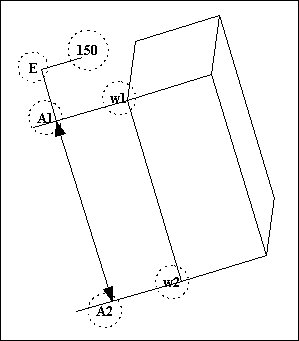
For a linear type of dimension, there are typically two arrow locations A1 and A2 as shown in the above figure. w1 and w2 indicate the two witness line locations.
If the dimension type has an elbow joint indicated by E, the elbow length is the distance between the text and E. If the dimension does not have an elbow, the text occurs on the line between A1 and A2, and its position is returned by the function ProDimensionTextGet(). Pattern parameter dimensions and length-of-arc dimensions also typically return this dimension structure.
Figure 12. Angular dimensions
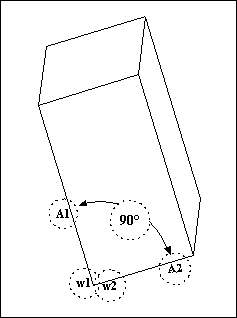
For an angular type of dimension, there are two arrow locations A1 and A2 as shown in the above figure. w1 and w2 indicate the two witness line locations. For some angular dimensions the two witness line endpoints are coincident, but they are returned as independent locations. This dimension type does not have an elbow joint.
Figure 13. Diameter dimensions
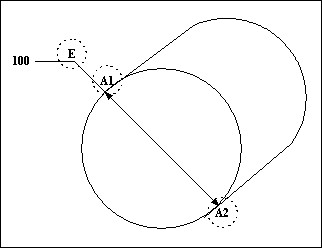
For a diameter type of dimension, there are two arrow locations A1 and A2 as shown in the above figure. The elbow joint for this dimension is indicated by E. The elbow length is the distance between the text and the elbow joint. This dimension type does not have any witness line locations.
Figure 14. Radius dimensions
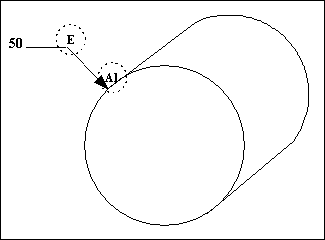
For a radius type dimension, there is one arrow location indicated by A1 and an elbow joint indicated by E. The elbow length is the distance between the text and the elbow joint.
The function ProDimlocationArrowsGet() returns a NULL value for the second arrow location. This dimension type does not have any witness line locations.