Parameter Example
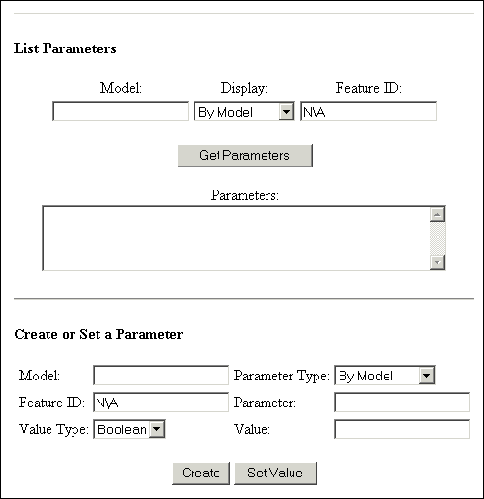
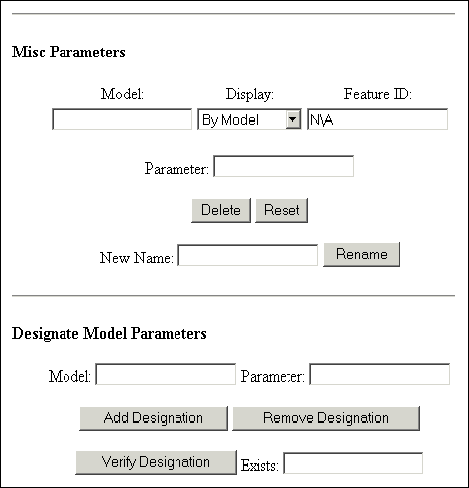
The following example shows how to use the Web.Link parameter functions.
<html xmlns:v="urn:schemas-microsoft-com:vml"
xmlns:o="urn:schemas-microsoft-com:office:office"
xmlns:w="urn:schemas-microsoft-com:office:word"
xmlns="http://www.w3.org/TR/REC-html40">
<head>
<meta http-equiv=Content-Type content="text/html; charset=us-ascii">
<meta name=ProgId content=Word.Document>
<meta name=Generator content="Microsoft Word 9">
<meta name=Originator content="Microsoft Word 9">
<link rel=File-List href="./parameters_files/filelist.xml">
<link rel=Edit-Time-Data href="./parameters_files/editdata.mso">
<!--[if !mso]>
<style>
v\:* {behavior:url(#default#VML);}
o\:* {behavior:url(#default#VML);}
w\:* {behavior:url(#default#VML);}
.shape {behavior:url(#default#VML);}
</style>
<![endif]-->
<title>Web.Link Parameters Test</title>
<!--[if gte mso 9]><xml>
<o:DocumentProperties>
<o:Author>Scott Conover</o:Author>
<o:LastAuthor>Scott Conover</o:LastAuthor>
<o:Revision>5</o:Revision>
<o:TotalTime>7</o:TotalTime>
<o:Created>2002-11-22T15:28:00Z</o:Created>
<o:LastSaved>2002-11-22T15:46:00Z</o:LastSaved>
<o:Pages>1</o:Pages>
<o:Words>151</o:Words>
<o:Characters>863</o:Characters>
<o:Company>PTC</o:Company>
<o:Lines>7</o:Lines>
<o:Paragraphs>1</o:Paragraphs>
<o:CharactersWithSpaces>1059</o:CharactersWithSpaces>
<o:Version>9.3821</o:Version>
</o:DocumentProperties>
</xml><![endif]-->
<style>
<!--
/* Style Definitions */
p.MsoNormal, li.MsoNormal, div.MsoNormal
{mso-style-parent:"";
margin:0in;
margin-bottom:.0001pt;
mso-pagination:widow-orphan;
font-size:12.0pt;
font-family:"Times New Roman";
mso-fareast-font-family:"Times New Roman";}
p
{margin-right:0in;
mso-margin-top-alt:auto;
mso-margin-bottom-alt:auto;
margin-left:0in;
mso-pagination:widow-orphan;
font-size:12.0pt;
font-family:"Times New Roman";
mso-fareast-font-family:"Times New Roman";}
@page Section1
{size:8.5in 11.0in;
margin:1.0in 1.25in 1.0in 1.25in;
mso-header-margin:.5in;
mso-footer-margin:.5in;
mso-paper-source:0;}
div.Section1
{page:Section1;}
-->
</style>
<script src="../jscript/pfcUtils.js">
</script>
<script src="../jscript/wl_header.js">
</script>
<script>
function WlParametersGet()
// Get the parameter list from the model or feature.
{
var ret;
var FunctionName;
var ItemType;
var FeatureID;
if (document.list_parm.ModelNameExt.value == "")
{
return ;
}
ItemType = document.pwl.eval(document.list_parm.ParmType.options[
document.list_parm.ParmType.selectedIndex].value);
if (parseInt(ItemType) == parseInt(document.pwlc.PWL_FEATURE))
{
if (document.list_parm.FeatureID.value == "")
{
return ;
}
FeatureID = parseInt(document.list_parm.FeatureID.value);
if (isNaN (FeatureID))
{
alert ("Invalid feature ID!");
return;
}
ret = document.pwl.pwlFeatureParametersGet(
document.list_parm.ModelNameExt.value,
parseInt(document.list_parm.FeatureID.value));
FunctionName = "pwlFeatureParametersGet";
}
else
{
FeatureID = -1;
ret = document.pwl.pwlMdlParametersGet(
document.list_parm.ModelNameExt.value);
FunctionName = "pwlMdlParametersGet";
}
if (!ret.Status)
{
alert(FunctionName + " failed (" + ret.ErrorCode + ")");
return ;
}
document.list_parm.Parameters.value = "";
for (var i = 0; i < ret.NumParams; i++)
{
var val_ret = document.pwl.pwlParameterValueGet(
document.list_parm.ModelNameExt.value,
parseInt(ItemType),
FeatureID,
ret.ParamNames.Item(i));
if (!val_ret.Status)
{
alert("pwlParameterValueGet failed (" + val_ret.ErrorCode + ")");
return ;
}
var answer = "Undefined";
if (val_ret.ParamType == parseInt(document.pwlc.PWL_VALUE_DOUBLE))
{
answer = val_ret.ParamDoubleVal;
}
else if (val_ret.ParamType == parseInt(document.pwlc.PWL_VALUE_STRING))
{
answer = val_ret.ParamStringVal;
}
else if (val_ret.ParamType == parseInt(document.pwlc.PWL_VALUE_INTEGER))
{
answer = val_ret.ParamIntVal;
}
else if (val_ret.ParamType == parseInt(document.pwlc.PWL_VALUE_BOOLEAN))
{
answer = (val_ret.ParamBooleanVal) ? "true" : "false";
}
document.list_parm.Parameters.value += ret.ParamNames.Item(i) + ": " +
answer +"\n";
}
}
function WlParameterSetValue(FunctionName)
// Set a parameter or create a new parameter, depending on the function
// name.
{
var ItemType;
var StringValue = document.set_value.Value.value;
var FloatValue = parseFloat(document.set_value.Value.value);
var IntValue = parseInt(document.set_value.Value.value);
var BoolValue = (document.set_value.Value.value.toLowerCase() == "true") ?
true : false;
var ValueType = document.pwl.eval(document.set_value.ValueType.options[
document.set_value.ValueType.selectedIndex].value);
// In order to create usable trail file FloatValue cannot be NaN
if (isNaN(FloatValue))
{
FloatValue = 1.1;
}
if (isNaN (IntValue))
{
IntValue = -5;
}
ItemType = document.pwl.eval(document.set_value.ParmType.options[
document.set_value.ParmType.selectedIndex].value);
if (ItemType == document.pwlc.PWL_MODEL)
featureID = -1;
else
featureID = parseInt(document.set_value.FeatureID.value);
if (FunctionName == "pwlParameterCreate")
{
var ret = document.pwl.pwlParameterCreate (
document.set_value.ModelNameExt.value,
ItemType,
featureID,
document.set_value.Parameter.value, ValueType,
IntValue, FloatValue, StringValue, BoolValue);
}
else
{
var ret = document.pwl.pwlParameterValueSet (
document.set_value.ModelNameExt.value,
ItemType,
featureID,
document.set_value.Parameter.value, ValueType,
IntValue, FloatValue, StringValue, BoolValue);
}
if (!ret.Status)
{
alert(FunctionName + " failed (" + ret.ErrorCode + ")");
return ;
}
}
function WlParameterMisc(FunctionName)
// Run miscellaneous parameter functions that take only model name,
// item type, item ID, and parameter name as arguments.
{
var ItemType;
ItemType = document.pwl.eval(document.misc_parm.ParmType.options[
document.misc_parm.ParmType.selectedIndex].value);
if (ItemType == document.pwlc.PWL_MODEL)
{
FeatureID = -1;
}
else
{
FeatureID = parseInt(document.misc_parm.FeatureID.value);
if (isNaN (FeatureID))
{
alert ("Invalid feature id: "+FeatureID);
return;
}
}
if (FunctionName == "pwlParameterReset")
{
var ret = document.pwl.pwlParameterReset(
document.misc_parm.ModelNameExt.value,
ItemType,
FeatureID,
document.misc_parm.Parameter.value);
}
else
{
var ret = document.pwl.pwlParameterDelete(
document.misc_parm.ModelNameExt.value,
ItemType,
FeatureID,
document.misc_parm.Parameter.value);
}
if (!ret.Status)
{
alert(FunctionName + " failed (" + ret.ErrorCode + ")");
return ;
}
}
function WlParameterRename()
// Rename a parameter.
{
var ItemType;
ItemType = document.pwl.eval(document.misc_parm.ParmType.options[
document.misc_parm.ParmType.selectedIndex].value);
if (ItemType == document.pwlc.PWL_MODEL)
{
FeatureID = -1;
}
else
{
FeatureID = parseInt(document.misc_parm.FeatureID.value);
if (isNaN (FeatureID))
{
alert ("Invalid feature id: "+FeatureID);
return;
}
}
var ret = document.pwl.pwlParameterRename(
document.misc_parm.ModelNameExt.value,
ItemType,
FeatureID,
document.misc_parm.Parameter.value,
document.misc_parm.NewName.value);
if (!ret.Status)
{
alert("pwlParameterRename failed (" + ret.ErrorCode + ")");
return ;
}
}
function WlParameterDesignate(FunctionName)
// Run designate parameter functions that take only the model name
// and parameter name as arguments and don't return anything.
{
if (FunctionName == "pwlParameterDesignationAdd")
{
var ret = document.pwl.pwlParameterDesignationAdd(
document.desg_parm.ModelNameExt.value,
document.desg_parm.Parameter.value);
}
else
{
var ret = document.pwl.pwlParameterDesignationRemove(
document.desg_parm.ModelNameExt.value,
document.desg_parm.Parameter.value);
}
if (!ret.Status)
{
alert(FunctionName + " failed (" + ret.ErrorCode + ")");
return ;
}
}
function WlParameterVerifyDesignation()
// Verify that a parameter has been designated.
{
var ret = document.pwl.pwlParameterDesignationVerify(
document.desg_parm.ModelNameExt.value,
document.desg_parm.Parameter.value);
if (!ret.Status)
{
alert("pwlParameterDesignationVerify failed (" + ret.ErrorCode + ")");
return ;
}
document.desg_parm.Exist.value = ret.Exists;
}
function NotApplicable(form)
// Print N\A in the feature ID field when a model is selected.
{
if (form.ParmType.options[form.ParmType.selectedIndex].value == "PWL_MODEL")
{
form.FeatureID.value = "N\\A";
}
else if (form.FeatureID.value == "N\\A")
{
form.FeatureID.value = "";
}
}
</script>
<!--[if gte mso 9]><xml>
<o:shapedefaults v:ext="edit" spidmax="1027"/>
</xml><![endif]--><!--[if gte mso 9]><xml>
<o:shapelayout v:ext="edit">
<o:idmap v:ext="edit" data="1"/>
</o:shapelayout></xml><![endif]-->
</head>
<body lang=EN-US style='tab-interval:.5in'>
<div class=Section1>
<form name="list_parm">
<h4>List Parameters<o:p></o:p></h4>
<div align=center>
<table border=0 cellpadding=0 style='mso-cellspacing:1.5pt;mso-padding-alt:
0in 0in 0in 0in'>
<tr>
<td style='padding:.75pt .75pt .75pt .75pt'>
<p align=center style='text-align:center'><!-- Input arguments -->Model:</p>
</td>
<td style='padding:.75pt .75pt .75pt .75pt'>
<p align=center style='text-align:center'>Display:</p>
</td>
<td style='padding:.75pt .75pt .75pt .75pt'>
<p align=center style='text-align:center'>Feature ID:</p>
</td>
</tr>
<tr>
<td style='padding:.75pt .75pt .75pt .75pt'>
<p class=MsoNormal align=center style='text-align:center'>
<INPUT TYPE="text" SIZE="20" NAME="ModelNameExt"><o:p></o:p></p>
</td>
<td style='padding:.75pt .75pt .75pt .75pt'>
<p class=MsoNormal align=center style='text-align:center'><SELECT NAME="ParmType"
onchange="NotApplicable(document.list_parm)">
<OPTION SELECTED VALUE="PWL_MODEL">By Model
<OPTION VALUE="PWL_FEATURE">By Feature ID
</SELECT></p>
</td>
<td style='padding:.75pt .75pt .75pt .75pt'>
<p class=MsoNormal align=center style='text-align:center'><INPUT TYPE="text" SIZE="20" NAME="FeatureID" VALUE="N\A"></p>
</td>
</tr>
</table>
</div>
<!-- Buttons -->
<p align=center style='text-align:center'>
<input type=button value="Get Parameters" onclick="WlParametersGet()">
<!-- Output arguments -->Parameters:<br>
<TEXTAREA COLS="50" NAME="Parameters"></TEXTAREA></p>
<div class=MsoNormal align=center style='text-align:center'>
<hr size=2 width="100%" align=center>
</div>
</form>
<form name="set_value">
<h4>Create or Set a Parameter<o:p></o:p></h4>
<div align=center>
<table border=0 cellpadding=0 style='mso-cellspacing:1.5pt;mso-padding-alt:
0in 0in 0in 0in'>
<tr>
<td style='padding:.75pt .75pt .75pt .75pt'>
<p class=MsoNormal><!-- Input arguments -->Model:</p>
</td>
<td style='padding:.75pt .75pt .75pt .75pt'>
<p class=MsoNormal><INPUT TYPE="text" SIZE="20" NAME="ModelNameExt"></p>
</td>
<td style='padding:.75pt .75pt .75pt .75pt'>
<p class=MsoNormal>Parameter Type:<o:p></o:p></p>
</td>
<td style='padding:.75pt .75pt .75pt .75pt'>
<p class=MsoNormal><SELECT NAME="ParmType"
onchange="NotApplicable(document.set_value)">
<OPTION SELECTED VALUE="PWL_MODEL">By Model
<OPTION VALUE="PWL_FEATURE">By Feature ID
</SELECT></p>
</td>
</tr>
<tr>
<td style='padding:.75pt .75pt .75pt .75pt'>
<p class=MsoNormal>Feature ID:</p>
</td>
<td style='padding:.75pt .75pt .75pt .75pt'>
<p class=MsoNormal><INPUT TYPE="text" SIZE="20" NAME="FeatureID" VALUE="N\A"></p>
</td>
<td style='padding:.75pt .75pt .75pt .75pt'>
<p class=MsoNormal>Parameter:</p>
</td>
<td style='padding:.75pt .75pt .75pt .75pt'>
<p class=MsoNormal><INPUT TYPE="text" SIZE="20" NAME="Parameter"></p>
</td>
</tr>
<tr>
<td style='padding:.75pt .75pt .75pt .75pt'>
<p class=MsoNormal>Value Type:</p>
</td>
<td style='padding:.75pt .75pt .75pt .75pt'>
<p class=MsoNormal><SELECT NAME="ValueType">
<OPTION VALUE="PWL_VALUE_BOOLEAN">Boolean
<OPTION VALUE="PWL_VALUE_DOUBLE">Double
<OPTION VALUE="PWL_VALUE_INTEGER">Integer
<OPTION VALUE="PWL_VALUE_STRING">String
</SELECT></p>
</td>
<td style='padding:.75pt .75pt .75pt .75pt'>
<p class=MsoNormal>Value:</p>
</td>
<td style='padding:.75pt .75pt .75pt .75pt'>
<p class=MsoNormal><INPUT TYPE="text" SIZE="20" NAME="Value"></p>
</td>
</tr>
</table>
</div>
<!-- Buttons -->
<div class=MsoNormal align=center style='text-align:center'>
<hr size=2 width="100%" align=center>
<input type=button value=Create onclick="WlParameterSetValue('pwlParameterCreate')">
<input type=button value="Set Value" onclick="WlParameterSetValue('pwlParameterValueSet')">
</div>
</form>
<form name="misc_parm">
<h4>Misc Parameters<o:p></o:p></h4>
<div align=center>
<table border=0 cellpadding=0 style='mso-cellspacing:1.5pt;mso-padding-alt:
0in 0in 0in 0in'>
<tr>
<td style='padding:.75pt .75pt .75pt .75pt'>
<p align=center style='text-align:center'><!-- Input arguments -->Model:</p>
</td>
<td style='padding:.75pt .75pt .75pt .75pt'>
<p align=center style='text-align:center'>Display:</p>
</td>
<td style='padding:.75pt .75pt .75pt .75pt'>
<p align=center style='text-align:center'>Feature ID:</p>
</td>
</tr>
<tr>
<td style='padding:.75pt .75pt .75pt .75pt'>
<p class=MsoNormal align=center style='text-align:center'>
<INPUT TYPE="text" SIZE="20" NAME="ModelNameExt"><o:p></o:p></p>
</td>
<td style='padding:.75pt .75pt .75pt .75pt'>
<p class=MsoNormal align=center style='text-align:center'><SELECT NAME="ParmType"
onchange="NotApplicable(document.misc_parm)">
<OPTION SELECTED VALUE="PWL_MODEL">By Model
<OPTION VALUE="PWL_FEATURE">By Feature ID
</SELECT></p>
</td>
<td style='padding:.75pt .75pt .75pt .75pt'>
<p class=MsoNormal align=center style='text-align:center'>
<INPUT TYPE="text" SIZE="20" NAME="FeatureID" VALUE="N\A"></p>
</td>
</tr>
</table>
</div>
<p align=center style='text-align:center'>Parameter:
<INPUT TYPE="text" SIZE="20" NAME="Parameter"><o:p></o:p></p>
<p align=center style='text-align:center'><!-- Buttons -->
<input type=button value=Delete onclick="WlParameterMisc('pwlParameterDelete')">
<input type=button value=Reset onclick="WlParameterMisc('pwlParameterReset')">
<input type=button value=Rename onclick="WlParameterRename()">
<!-- Extra input arguments and a button for rename -->New Name:
<INPUT TYPE="text" SIZE="20" NAME="NewName">
<spacer size=20>
<o:p></o:p></p>
<div class=MsoNormal align=center style='text-align:center'>
<hr size=2 width="100%" align=center>
</div>
</form>
<form name="desg_parm">
<h4>Designate Model Parameters<o:p></o:p></h4>
<p align=center style='text-align:center'><!-- Input arguments -->Model:
<INPUT TYPE="text" SIZE="20" NAME="ModelNameExt">
<spacer size=20>
Parameter: <INPUT TYPE="text" SIZE="20" NAME="Parameter"><o:p></o:p></p>
<p align=center style='text-align:center'><!-- Buttons -->
<input type=button value="Add Designation" onclick=
"WlParameterDesignate('pwlParameterDesignationAdd')">
<input type=button value="Remove Designation" onclick=
"WlParameterDesignate('pwlParameterDesignationRemove')">
<br>
<!-- Extra output arguments and a button for verifying designations -->
<input type=button value="Verify Designation" onclick="WlParameterVerifyDesignation()">
<spacer size=20>
Exists: <INPUT TYPE="text" SIZE="20" NAME="Exist"></p>
<div class=MsoNormal align=center style='text-align:center'>
<hr size=2 width="100%" align=center>
</div>
</form>
</div>
</body>
</html>
xmlns:o="urn:schemas-microsoft-com:office:office"
xmlns:w="urn:schemas-microsoft-com:office:word"
xmlns="http://www.w3.org/TR/REC-html40">
<head>
<meta http-equiv=Content-Type content="text/html; charset=us-ascii">
<meta name=ProgId content=Word.Document>
<meta name=Generator content="Microsoft Word 9">
<meta name=Originator content="Microsoft Word 9">
<link rel=File-List href="./parameters_files/filelist.xml">
<link rel=Edit-Time-Data href="./parameters_files/editdata.mso">
<!--[if !mso]>
<style>
v\:* {behavior:url(#default#VML);}
o\:* {behavior:url(#default#VML);}
w\:* {behavior:url(#default#VML);}
.shape {behavior:url(#default#VML);}
</style>
<![endif]-->
<title>Web.Link Parameters Test</title>
<!--[if gte mso 9]><xml>
<o:DocumentProperties>
<o:Author>Scott Conover</o:Author>
<o:LastAuthor>Scott Conover</o:LastAuthor>
<o:Revision>5</o:Revision>
<o:TotalTime>7</o:TotalTime>
<o:Created>2002-11-22T15:28:00Z</o:Created>
<o:LastSaved>2002-11-22T15:46:00Z</o:LastSaved>
<o:Pages>1</o:Pages>
<o:Words>151</o:Words>
<o:Characters>863</o:Characters>
<o:Company>PTC</o:Company>
<o:Lines>7</o:Lines>
<o:Paragraphs>1</o:Paragraphs>
<o:CharactersWithSpaces>1059</o:CharactersWithSpaces>
<o:Version>9.3821</o:Version>
</o:DocumentProperties>
</xml><![endif]-->
<style>
<!--
/* Style Definitions */
p.MsoNormal, li.MsoNormal, div.MsoNormal
{mso-style-parent:"";
margin:0in;
margin-bottom:.0001pt;
mso-pagination:widow-orphan;
font-size:12.0pt;
font-family:"Times New Roman";
mso-fareast-font-family:"Times New Roman";}
p
{margin-right:0in;
mso-margin-top-alt:auto;
mso-margin-bottom-alt:auto;
margin-left:0in;
mso-pagination:widow-orphan;
font-size:12.0pt;
font-family:"Times New Roman";
mso-fareast-font-family:"Times New Roman";}
@page Section1
{size:8.5in 11.0in;
margin:1.0in 1.25in 1.0in 1.25in;
mso-header-margin:.5in;
mso-footer-margin:.5in;
mso-paper-source:0;}
div.Section1
{page:Section1;}
-->
</style>
<script src="../jscript/pfcUtils.js">
</script>
<script src="../jscript/wl_header.js">
</script>
<script>
function WlParametersGet()
// Get the parameter list from the model or feature.
{
var ret;
var FunctionName;
var ItemType;
var FeatureID;
if (document.list_parm.ModelNameExt.value == "")
{
return ;
}
ItemType = document.pwl.eval(document.list_parm.ParmType.options[
document.list_parm.ParmType.selectedIndex].value);
if (parseInt(ItemType) == parseInt(document.pwlc.PWL_FEATURE))
{
if (document.list_parm.FeatureID.value == "")
{
return ;
}
FeatureID = parseInt(document.list_parm.FeatureID.value);
if (isNaN (FeatureID))
{
alert ("Invalid feature ID!");
return;
}
ret = document.pwl.pwlFeatureParametersGet(
document.list_parm.ModelNameExt.value,
parseInt(document.list_parm.FeatureID.value));
FunctionName = "pwlFeatureParametersGet";
}
else
{
FeatureID = -1;
ret = document.pwl.pwlMdlParametersGet(
document.list_parm.ModelNameExt.value);
FunctionName = "pwlMdlParametersGet";
}
if (!ret.Status)
{
alert(FunctionName + " failed (" + ret.ErrorCode + ")");
return ;
}
document.list_parm.Parameters.value = "";
for (var i = 0; i < ret.NumParams; i++)
{
var val_ret = document.pwl.pwlParameterValueGet(
document.list_parm.ModelNameExt.value,
parseInt(ItemType),
FeatureID,
ret.ParamNames.Item(i));
if (!val_ret.Status)
{
alert("pwlParameterValueGet failed (" + val_ret.ErrorCode + ")");
return ;
}
var answer = "Undefined";
if (val_ret.ParamType == parseInt(document.pwlc.PWL_VALUE_DOUBLE))
{
answer = val_ret.ParamDoubleVal;
}
else if (val_ret.ParamType == parseInt(document.pwlc.PWL_VALUE_STRING))
{
answer = val_ret.ParamStringVal;
}
else if (val_ret.ParamType == parseInt(document.pwlc.PWL_VALUE_INTEGER))
{
answer = val_ret.ParamIntVal;
}
else if (val_ret.ParamType == parseInt(document.pwlc.PWL_VALUE_BOOLEAN))
{
answer = (val_ret.ParamBooleanVal) ? "true" : "false";
}
document.list_parm.Parameters.value += ret.ParamNames.Item(i) + ": " +
answer +"\n";
}
}
function WlParameterSetValue(FunctionName)
// Set a parameter or create a new parameter, depending on the function
// name.
{
var ItemType;
var StringValue = document.set_value.Value.value;
var FloatValue = parseFloat(document.set_value.Value.value);
var IntValue = parseInt(document.set_value.Value.value);
var BoolValue = (document.set_value.Value.value.toLowerCase() == "true") ?
true : false;
var ValueType = document.pwl.eval(document.set_value.ValueType.options[
document.set_value.ValueType.selectedIndex].value);
// In order to create usable trail file FloatValue cannot be NaN
if (isNaN(FloatValue))
{
FloatValue = 1.1;
}
if (isNaN (IntValue))
{
IntValue = -5;
}
ItemType = document.pwl.eval(document.set_value.ParmType.options[
document.set_value.ParmType.selectedIndex].value);
if (ItemType == document.pwlc.PWL_MODEL)
featureID = -1;
else
featureID = parseInt(document.set_value.FeatureID.value);
if (FunctionName == "pwlParameterCreate")
{
var ret = document.pwl.pwlParameterCreate (
document.set_value.ModelNameExt.value,
ItemType,
featureID,
document.set_value.Parameter.value, ValueType,
IntValue, FloatValue, StringValue, BoolValue);
}
else
{
var ret = document.pwl.pwlParameterValueSet (
document.set_value.ModelNameExt.value,
ItemType,
featureID,
document.set_value.Parameter.value, ValueType,
IntValue, FloatValue, StringValue, BoolValue);
}
if (!ret.Status)
{
alert(FunctionName + " failed (" + ret.ErrorCode + ")");
return ;
}
}
function WlParameterMisc(FunctionName)
// Run miscellaneous parameter functions that take only model name,
// item type, item ID, and parameter name as arguments.
{
var ItemType;
ItemType = document.pwl.eval(document.misc_parm.ParmType.options[
document.misc_parm.ParmType.selectedIndex].value);
if (ItemType == document.pwlc.PWL_MODEL)
{
FeatureID = -1;
}
else
{
FeatureID = parseInt(document.misc_parm.FeatureID.value);
if (isNaN (FeatureID))
{
alert ("Invalid feature id: "+FeatureID);
return;
}
}
if (FunctionName == "pwlParameterReset")
{
var ret = document.pwl.pwlParameterReset(
document.misc_parm.ModelNameExt.value,
ItemType,
FeatureID,
document.misc_parm.Parameter.value);
}
else
{
var ret = document.pwl.pwlParameterDelete(
document.misc_parm.ModelNameExt.value,
ItemType,
FeatureID,
document.misc_parm.Parameter.value);
}
if (!ret.Status)
{
alert(FunctionName + " failed (" + ret.ErrorCode + ")");
return ;
}
}
function WlParameterRename()
// Rename a parameter.
{
var ItemType;
ItemType = document.pwl.eval(document.misc_parm.ParmType.options[
document.misc_parm.ParmType.selectedIndex].value);
if (ItemType == document.pwlc.PWL_MODEL)
{
FeatureID = -1;
}
else
{
FeatureID = parseInt(document.misc_parm.FeatureID.value);
if (isNaN (FeatureID))
{
alert ("Invalid feature id: "+FeatureID);
return;
}
}
var ret = document.pwl.pwlParameterRename(
document.misc_parm.ModelNameExt.value,
ItemType,
FeatureID,
document.misc_parm.Parameter.value,
document.misc_parm.NewName.value);
if (!ret.Status)
{
alert("pwlParameterRename failed (" + ret.ErrorCode + ")");
return ;
}
}
function WlParameterDesignate(FunctionName)
// Run designate parameter functions that take only the model name
// and parameter name as arguments and don't return anything.
{
if (FunctionName == "pwlParameterDesignationAdd")
{
var ret = document.pwl.pwlParameterDesignationAdd(
document.desg_parm.ModelNameExt.value,
document.desg_parm.Parameter.value);
}
else
{
var ret = document.pwl.pwlParameterDesignationRemove(
document.desg_parm.ModelNameExt.value,
document.desg_parm.Parameter.value);
}
if (!ret.Status)
{
alert(FunctionName + " failed (" + ret.ErrorCode + ")");
return ;
}
}
function WlParameterVerifyDesignation()
// Verify that a parameter has been designated.
{
var ret = document.pwl.pwlParameterDesignationVerify(
document.desg_parm.ModelNameExt.value,
document.desg_parm.Parameter.value);
if (!ret.Status)
{
alert("pwlParameterDesignationVerify failed (" + ret.ErrorCode + ")");
return ;
}
document.desg_parm.Exist.value = ret.Exists;
}
function NotApplicable(form)
// Print N\A in the feature ID field when a model is selected.
{
if (form.ParmType.options[form.ParmType.selectedIndex].value == "PWL_MODEL")
{
form.FeatureID.value = "N\\A";
}
else if (form.FeatureID.value == "N\\A")
{
form.FeatureID.value = "";
}
}
</script>
<!--[if gte mso 9]><xml>
<o:shapedefaults v:ext="edit" spidmax="1027"/>
</xml><![endif]--><!--[if gte mso 9]><xml>
<o:shapelayout v:ext="edit">
<o:idmap v:ext="edit" data="1"/>
</o:shapelayout></xml><![endif]-->
</head>
<body lang=EN-US style='tab-interval:.5in'>
<div class=Section1>
<form name="list_parm">
<h4>List Parameters<o:p></o:p></h4>
<div align=center>
<table border=0 cellpadding=0 style='mso-cellspacing:1.5pt;mso-padding-alt:
0in 0in 0in 0in'>
<tr>
<td style='padding:.75pt .75pt .75pt .75pt'>
<p align=center style='text-align:center'><!-- Input arguments -->Model:</p>
</td>
<td style='padding:.75pt .75pt .75pt .75pt'>
<p align=center style='text-align:center'>Display:</p>
</td>
<td style='padding:.75pt .75pt .75pt .75pt'>
<p align=center style='text-align:center'>Feature ID:</p>
</td>
</tr>
<tr>
<td style='padding:.75pt .75pt .75pt .75pt'>
<p class=MsoNormal align=center style='text-align:center'>
<INPUT TYPE="text" SIZE="20" NAME="ModelNameExt"><o:p></o:p></p>
</td>
<td style='padding:.75pt .75pt .75pt .75pt'>
<p class=MsoNormal align=center style='text-align:center'><SELECT NAME="ParmType"
onchange="NotApplicable(document.list_parm)">
<OPTION SELECTED VALUE="PWL_MODEL">By Model
<OPTION VALUE="PWL_FEATURE">By Feature ID
</SELECT></p>
</td>
<td style='padding:.75pt .75pt .75pt .75pt'>
<p class=MsoNormal align=center style='text-align:center'><INPUT TYPE="text" SIZE="20" NAME="FeatureID" VALUE="N\A"></p>
</td>
</tr>
</table>
</div>
<!-- Buttons -->
<p align=center style='text-align:center'>
<input type=button value="Get Parameters" onclick="WlParametersGet()">
<!-- Output arguments -->Parameters:<br>
<TEXTAREA COLS="50" NAME="Parameters"></TEXTAREA></p>
<div class=MsoNormal align=center style='text-align:center'>
<hr size=2 width="100%" align=center>
</div>
</form>
<form name="set_value">
<h4>Create or Set a Parameter<o:p></o:p></h4>
<div align=center>
<table border=0 cellpadding=0 style='mso-cellspacing:1.5pt;mso-padding-alt:
0in 0in 0in 0in'>
<tr>
<td style='padding:.75pt .75pt .75pt .75pt'>
<p class=MsoNormal><!-- Input arguments -->Model:</p>
</td>
<td style='padding:.75pt .75pt .75pt .75pt'>
<p class=MsoNormal><INPUT TYPE="text" SIZE="20" NAME="ModelNameExt"></p>
</td>
<td style='padding:.75pt .75pt .75pt .75pt'>
<p class=MsoNormal>Parameter Type:<o:p></o:p></p>
</td>
<td style='padding:.75pt .75pt .75pt .75pt'>
<p class=MsoNormal><SELECT NAME="ParmType"
onchange="NotApplicable(document.set_value)">
<OPTION SELECTED VALUE="PWL_MODEL">By Model
<OPTION VALUE="PWL_FEATURE">By Feature ID
</SELECT></p>
</td>
</tr>
<tr>
<td style='padding:.75pt .75pt .75pt .75pt'>
<p class=MsoNormal>Feature ID:</p>
</td>
<td style='padding:.75pt .75pt .75pt .75pt'>
<p class=MsoNormal><INPUT TYPE="text" SIZE="20" NAME="FeatureID" VALUE="N\A"></p>
</td>
<td style='padding:.75pt .75pt .75pt .75pt'>
<p class=MsoNormal>Parameter:</p>
</td>
<td style='padding:.75pt .75pt .75pt .75pt'>
<p class=MsoNormal><INPUT TYPE="text" SIZE="20" NAME="Parameter"></p>
</td>
</tr>
<tr>
<td style='padding:.75pt .75pt .75pt .75pt'>
<p class=MsoNormal>Value Type:</p>
</td>
<td style='padding:.75pt .75pt .75pt .75pt'>
<p class=MsoNormal><SELECT NAME="ValueType">
<OPTION VALUE="PWL_VALUE_BOOLEAN">Boolean
<OPTION VALUE="PWL_VALUE_DOUBLE">Double
<OPTION VALUE="PWL_VALUE_INTEGER">Integer
<OPTION VALUE="PWL_VALUE_STRING">String
</SELECT></p>
</td>
<td style='padding:.75pt .75pt .75pt .75pt'>
<p class=MsoNormal>Value:</p>
</td>
<td style='padding:.75pt .75pt .75pt .75pt'>
<p class=MsoNormal><INPUT TYPE="text" SIZE="20" NAME="Value"></p>
</td>
</tr>
</table>
</div>
<!-- Buttons -->
<div class=MsoNormal align=center style='text-align:center'>
<hr size=2 width="100%" align=center>
<input type=button value=Create onclick="WlParameterSetValue('pwlParameterCreate')">
<input type=button value="Set Value" onclick="WlParameterSetValue('pwlParameterValueSet')">
</div>
</form>
<form name="misc_parm">
<h4>Misc Parameters<o:p></o:p></h4>
<div align=center>
<table border=0 cellpadding=0 style='mso-cellspacing:1.5pt;mso-padding-alt:
0in 0in 0in 0in'>
<tr>
<td style='padding:.75pt .75pt .75pt .75pt'>
<p align=center style='text-align:center'><!-- Input arguments -->Model:</p>
</td>
<td style='padding:.75pt .75pt .75pt .75pt'>
<p align=center style='text-align:center'>Display:</p>
</td>
<td style='padding:.75pt .75pt .75pt .75pt'>
<p align=center style='text-align:center'>Feature ID:</p>
</td>
</tr>
<tr>
<td style='padding:.75pt .75pt .75pt .75pt'>
<p class=MsoNormal align=center style='text-align:center'>
<INPUT TYPE="text" SIZE="20" NAME="ModelNameExt"><o:p></o:p></p>
</td>
<td style='padding:.75pt .75pt .75pt .75pt'>
<p class=MsoNormal align=center style='text-align:center'><SELECT NAME="ParmType"
onchange="NotApplicable(document.misc_parm)">
<OPTION SELECTED VALUE="PWL_MODEL">By Model
<OPTION VALUE="PWL_FEATURE">By Feature ID
</SELECT></p>
</td>
<td style='padding:.75pt .75pt .75pt .75pt'>
<p class=MsoNormal align=center style='text-align:center'>
<INPUT TYPE="text" SIZE="20" NAME="FeatureID" VALUE="N\A"></p>
</td>
</tr>
</table>
</div>
<p align=center style='text-align:center'>Parameter:
<INPUT TYPE="text" SIZE="20" NAME="Parameter"><o:p></o:p></p>
<p align=center style='text-align:center'><!-- Buttons -->
<input type=button value=Delete onclick="WlParameterMisc('pwlParameterDelete')">
<input type=button value=Reset onclick="WlParameterMisc('pwlParameterReset')">
<input type=button value=Rename onclick="WlParameterRename()">
<!-- Extra input arguments and a button for rename -->New Name:
<INPUT TYPE="text" SIZE="20" NAME="NewName">
<spacer size=20>
<o:p></o:p></p>
<div class=MsoNormal align=center style='text-align:center'>
<hr size=2 width="100%" align=center>
</div>
</form>
<form name="desg_parm">
<h4>Designate Model Parameters<o:p></o:p></h4>
<p align=center style='text-align:center'><!-- Input arguments -->Model:
<INPUT TYPE="text" SIZE="20" NAME="ModelNameExt">
<spacer size=20>
Parameter: <INPUT TYPE="text" SIZE="20" NAME="Parameter"><o:p></o:p></p>
<p align=center style='text-align:center'><!-- Buttons -->
<input type=button value="Add Designation" onclick=
"WlParameterDesignate('pwlParameterDesignationAdd')">
<input type=button value="Remove Designation" onclick=
"WlParameterDesignate('pwlParameterDesignationRemove')">
<br>
<!-- Extra output arguments and a button for verifying designations -->
<input type=button value="Verify Designation" onclick="WlParameterVerifyDesignation()">
<spacer size=20>
Exists: <INPUT TYPE="text" SIZE="20" NAME="Exist"></p>
<div class=MsoNormal align=center style='text-align:center'>
<hr size=2 width="100%" align=center>
</div>
</form>
</div>
</body>
</html>
The following figures show the results of this example, as seen in the browser. Note that the first figure does not include the standard header. See the section JavaScript Header for more information on the wl_header.js header.