Enabling Security Settings
To run Web.Link in the embedded browser security set the following in Microsoft Internet Explorer:
• Allow scripting of ActiveX controls not marked as safe
• Allow active scripting
These security features can be set to the following values:
• Disable—The activity is not permitted. Attempting to load a Web.Link page will result in the following exception:
"Automation server can’t create object"
• Prompt—Each time the browser loads a web page that tries to access Web.Link methods and objects, you are prompted to allow the interaction activity as shown in the following figure.
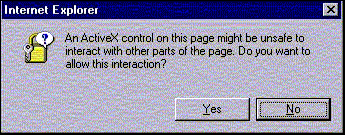
• Enable—The interaction activity is always permitted
Script security can be independently assigned to four domains:
• Intranet—The organization’s local intranet, including all access via file:// URLs and selected internal web servers.
• Trusted sites—Web sites designated as trusted.
• Restricted sites—Web sites designated as untrusted.
• Internet—All other sites accessed via the Internet.