Unlocking, Running, and Signing the Creo Object TOOLKIT Java Application using Creo+ User Interface
Before you distribute your application executable to the end user, you must unlock it.
To unlock a Creo Object TOOLKIT Java application, you must have either of the following licenses:
• Creo Object TOOLKIT Java development license, or
• Creo Object TOOLKIT Java extension license along with Creo TOOLKIT license to be present and unused on your license server
In Creo+ and later you can unlock your Creo Object TOOLKIT Java application in the Creo+ user interface.
To Unlock a Creo Object TOOLKIT JAVA in Creo+ User Interface
1. Click > > .
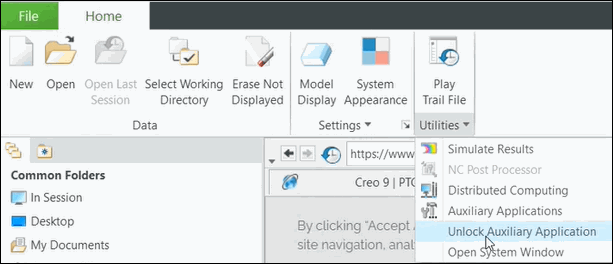
Or click > .
The dialog box Unlock Auxiliary Applications opens.
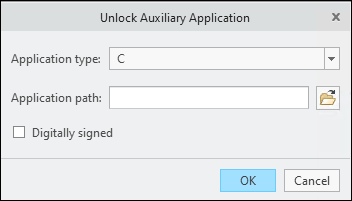
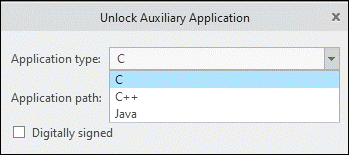
2. In the Application type drop-down box, select the type of your application.
3. In the Application Path browse to the .dll or .exe file of the application.
4. If you select JAVA, provide the Main Class path.
5. Select the checkbox Unlock for Digitally Signing. A dialog box Unlock Succeeded appears on the screen with the message:
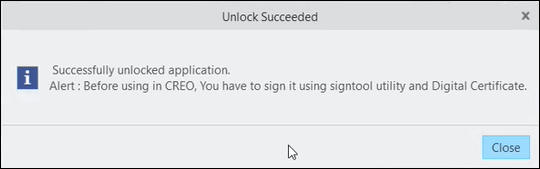
6. Click Close.
Your application is now unlocked.
 | Once you have unlocked the executable, you can distribute your application program to Creo Object TOOLKIT Java users in accordance with the license agreement. |
| | Once an application binary has been unlocked, it should not be modified in any way (which includes statically linking the unlocked binary with other libraries after the unlock). The unlocked binary must not be changed or else Creo+ will again consider it "locked". |
You require any of the following licenses to be present and unused on your license server to run an unlocked Creo Object TOOLKIT Java application:
• Creo Object TOOLKIT Java runtime license, or
• Creo Object TOOLKIT Java development license, or
• Both Creo Object TOOLKIT Java extension license and Creo TOOLKIT license
| | If a Creo Object TOOLKIT Java code has multi-byte characters, then save the file in UTF-8 without BOM encoding format. Use the option –encoding UTF-8 with the javac compiler to build class files. |
During the unlocking process, PTC’s digital signature is added to the unlocked Creo Object TOOLKIT Java application. You can also sign your Creo Object TOOLKIT Java applications using the standard Java utility jarsigner. Please refer to the Oracle documentation for more information on this utility.