Registering Custom Checks
Methods Introduced:
The method pfcSession.BaseSession.RegisterCustomModelCheck registers a custom check that can be included in any Creo ModelCHECK run. This method takes the instructions in the form of the CustomCheckInstructions object as its input argument. This object contains the following parameters:
• CheckName—Specifies the name of the custom check.
• CheckLabel—Specifies the label of the custom check.
• Listener—Specifies the listener object containing the custom check methods. Refer to the section Custom Check Listeners for more information.
• ActionButtonLabel—Specifies the label for the action button. If you specify NULL for this parameter, this button is not shown.
• UpdateButtonLabel—Specifies the label for the update button. If you specify NULL for this parameter, this button is not shown.
The method pfcModelCheck.pfcModelCheck.CustomCheckInstructions_Create creates the CustomCheckInstructions object containing the custom check instructions described above.
Use the methods pfcModelCheck.CustomCheckInstructions.SetCheckName, pfcModelCheck.CustomCheckInstructions.SetCheckLabel, pfcModelCheck.CustomCheckInstructions.SetListener, pfcModelCheck.CustomCheckInstructions.SetActionButtonLabel, and pfcModelCheck.CustomCheckInstructions.SetUpdateButtonLabel to modify the instructions.
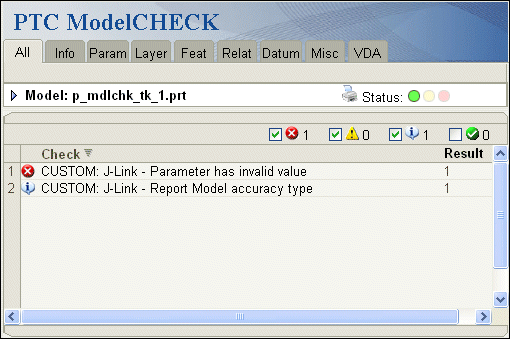
The following figure illustrates how the results of some custom checks might be displayed in the Creo ModelCHECK report.