Transformations
Methods and Properties Introduced:
All coordinate systems are treated in Creo.JS as if they were three-dimensional. Therefore, a point in any of the coordinate systems is always represented by the pfcPoint3D class:
Vectors store the same data but are represented for clarity by the pfcVector3D class.
Screen coordinates contain a z-value whose positive direction is outwards from the screen. The value of z is not generally important when specifying a screen location as an input to a method, but it is useful in other situations. For example, if you select a datum plane, you can find the direction of the plane by calculating the normal to the plane, transforming to screen coordinates, then looking at the sign of the z-coordinate.
A transformation between two coordinate systems is represented by the pfcTransform3D class. This class contains a 4x4 matrix that combines the conventional 3x3 matrix that describes the relative orientation of the two systems, and the vector that describes the shift between them.
The 4x4 matrix used for transformations is as follows:
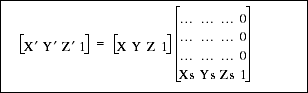
The utility method pfcTransform3D.Invert() inverts a transformation matrix so that it can be used to transform points in the opposite direction.
Creo.JS provides two utilities for performing coordinate transformations. The method pfcTransform3D.TransformPoint() transforms a three-dimensional point and pfcTransform3D.TransformVector() transforms a three-dimensional vector.
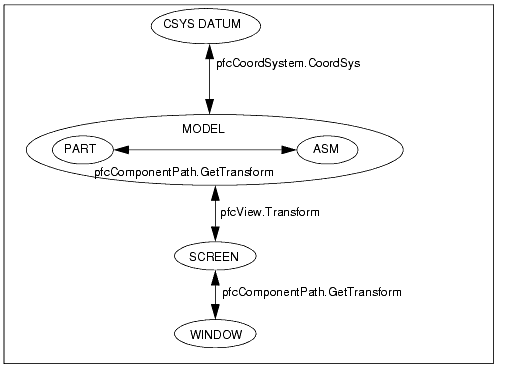
The following diagram summarizes the coordinate transformations needed when using Creo.JS and specifies the Creo.JS methods that provide the transformation matrix.
The method MpfcBase.pfcMakeMatrixOrthonormal() converts a non-orthonormal matrix to an orthonormal matrix with the specified scaling factor. The input arguments follow:
• Matrix—The matrix to be converted to orthonormal.
• Scale—Scale factor to be applied on the matrix.