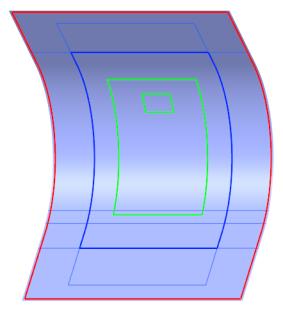
Create a Manual Ply (PLY_2)
1. Click  Ply. The Ply tab opens.
Ply. The Ply tab opens.2. Under Type, make sure that  Manual Ply is selected.
Manual Ply is selected.3. Select the boundary chain CompCrv:F8(CURVE), as shown in the following graphic:
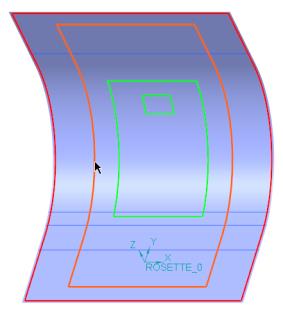
4. Press Ctrl and select the boundary chain CompCrv:F9(CURVE), as shown in the following graphic:
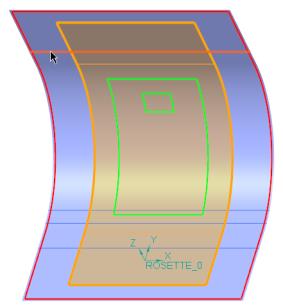
5. Press Ctrl and select the boundary chain CompCrv:F10(CURVE), as shown in the following graphic:
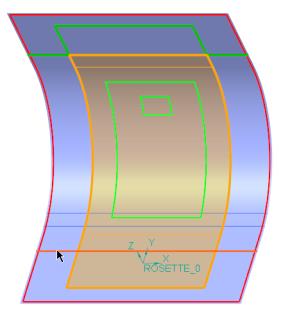
 | If needed, use  or or  to select the solution, as shown in the following graphic: to select the solution, as shown in the following graphic: |
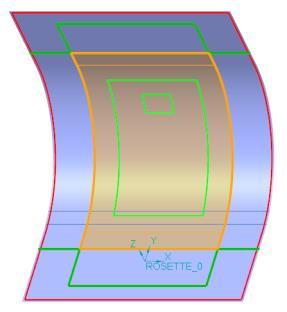
6. In the Material box, select UE1000_36.
7. Click  OK.
OK.
OK.The laminate object PLY_2 is added to the Laminate Tree.
The manual ply feature Manual Ply 2 is added to the Composite Tree.
8. Click in the empty space in the graphics window. The boundary of PLY_2 is highlighted, as shown in the following graphic: