Controller Parameters
The settings for the Controller module are as follows:
1. Click Controller under Physics Modules.
2. The following conditions and parameters are available in the Properties Panel.
a. Setup Options— The two options available under Setup Options, as shown in the figure are:
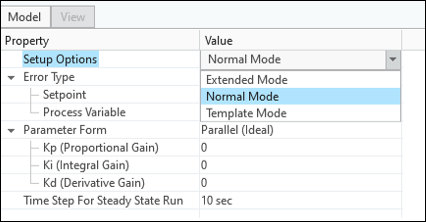
▪ Normal Mode— Provides standard access to the basic parameters to create the mesh.
▪ Extended Mode— Provides access to advanced settings available in addition to basic settings.
b. Error Type— This allows to choose the type of method to define the error.
▪ Standard— The error is calculated based on the difference between Setpoint and Process Variable, which must be provided as inputs.
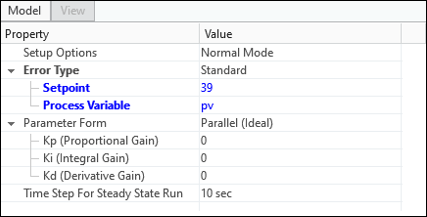
▪ Setpoint— This is used to assign set point or desired value, or control goal of the process with pressure or temperature or flow rate at any of boundaries in a volume.
▪ Process Variable— The process variable is the measurement variable at a boundary or volume. Process variable can be defined through expressions.
▪ Error Function— The error is calculated based on the error function provided. Error function can be defined through expressions.
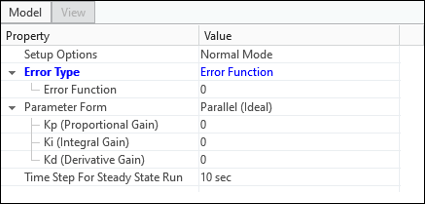
c. Parameter Form— This allows to choose the form of the control function.
▪ Parallel (Ideal)— The ideal form of control function equation is used. The parameters required are shown in the following figure.
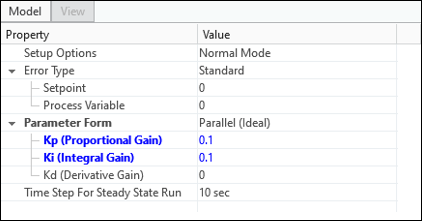
▪  (Proportional Gain)— This is the constant coefficient of proportional term.
(Proportional Gain)— This is the constant coefficient of proportional term.▪  (Integral gain)— This is the constant coefficient of integral term.
(Integral gain)— This is the constant coefficient of integral term.▪  (Derivative gain)— This is the constant coefficient of derivative term.
(Derivative gain)— This is the constant coefficient of derivative term.▪ Standard— The standard form of control function equation is used. The parameters required are shown in the following figure.
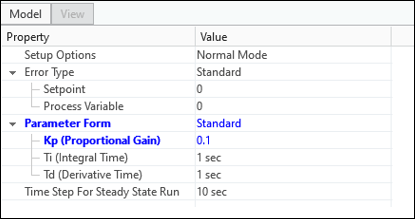
▪ (Proportional Gain)— This is the constant coefficient of proportional term.
(Proportional Gain)— This is the constant coefficient of proportional term.▪  (Integral time)— This is the sample time interval in which the I-controller tries to completely eliminate the error.
(Integral time)— This is the sample time interval in which the I-controller tries to completely eliminate the error.▪  (Derivative time)— This is the sample time at which the D-controller tries to predict the future error.
(Derivative time)— This is the sample time at which the D-controller tries to predict the future error. | , must be positive and non-zero. |
d. Initial Value— Allows to specify the initial value of the control variable.
e. Output Range— This is available in Advanced Mode under Setup Options. This allows to specify bounds of the control variable.
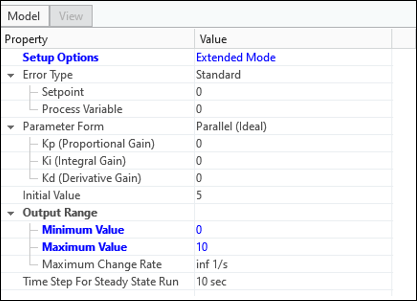
▪ Minimum Value— Allows to specify the minimum limit of the control variable.
▪ Maximum Value— Allows to specify the maximum limit of the control variable.
▪ Maximum Change Rate— Allows to specify the maximum limit of rate of change of the control variable.
f. Time Step for Steady State Run— The time step that is used to solve the control function.
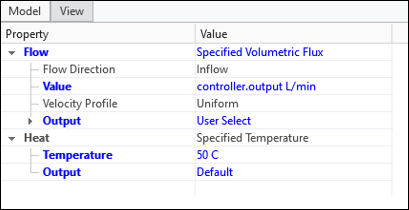
g. Define Control Variables— The control variable must be modified in a system to meet the desired value/set point that can be defined through expression. The syntax to define a control variable is controller.(subname).output or controller.(subname).CV. For example, flow rate at a boundary can be defined as a control variable, as shown in the figure.