Pattern by Dimension
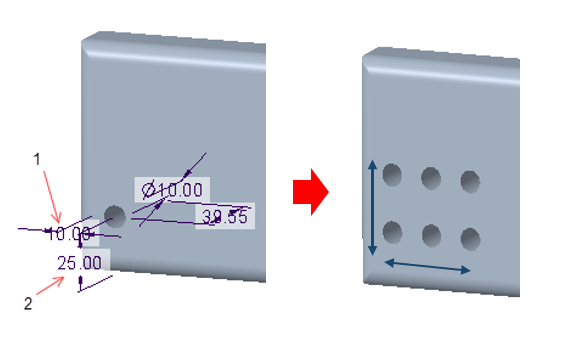
1. Select first dimension along which to increment the feature
2. Optionally, select a second dimension to create a two- dimensional pattern.
1. Select the feature to pattern.
2. Click  Pattern on the Model tab to open the Pattern tab.
Pattern on the Model tab to open the Pattern tab.3. Select Dimension from the Type list.
4. In the Graphics Window, click a dimension of the feature to specify the direction in which the feature is replicated.
5. In the Direction 1 area of the Dimensions tab, in the Increment box, enter the distance between adjacent pattern members.
6. In the Members box enter the number of instances to create.
7. Click  to complete the feature, or continue the steps to create a two-dimensional pattern.
to complete the feature, or continue the steps to create a two-dimensional pattern.8. Click the Direction 2 area of the Dimensions tab and then in the Graphics Window click a dimension of the feature to specify the second direction for the pattern.
9. In the Direction 2 area of the Dimensions tab, in the Increment box, enter the distance between adjacent pattern members.
10. In the Members box enter the number of instances to create.
11. Click .
.