Using ISO Tolerance Tables
Linear Dimensions
When the Use ISO tolerance tables checkbox is selected in the Options dialog box, EZ Tolerance Analysis uses ISO tolerance tables to assign default tolerances to linear dimensions.
Default tolerances for linear dimensions are derived from the General Dimensions tolerance table. The applied tolerance depends on:
• The Model Class property of the model
• The nominal size of the dimension
Default tolerances are determined when you create a new stackup or when an existing stackup is updated after you add or remove features.
To enable ISO tolerance tables for linear dimensions:
1. Click Options in the EZ Tolerance tab. The Options dialog box opens.
2. Select Use ISO tolerance tables.
3. Click OK.
To override a default tolerance for a linear dimension, click the tolerance value next to the dimension in the stackup table and then specify a new value in the Edit Tolerance dialog box.
Hole and Shaft Dimensions
You can use ISO tolerance tables to define default tolerances for the diameter dimensions of hole and shaft features.
To enable ISO tolerance tables for diameter dimensions of hole and shaft features:
1. Click Stackup Table in the EZ Tolerance tab. The EZ Tolerance Analysis dialog box opens.
2. Click  in front of a stackup to open the Stackup table showing the details of the stackup.
in front of a stackup to open the Stackup table showing the details of the stackup.3. Click the tolerance value next to a diameter dimension of a hole or shaft feature. The Edit Tolerance dialog box opens.
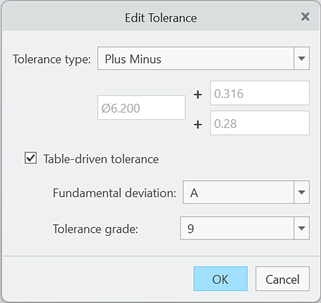
4. Select Table-driven tolerance to enable ISO tolerance tables.
5. Select the desired options in the Fundamental deviation and Tolerance grade boxes.
6. Click OK.
 | Symmetric tolerance type is not supported for table-driven tolerances. Only Plus Minus or Limits tolerance type may be used with table-driven tolerances. |
Limitations
ISO tolerance tables apply only to dimensions in the stackup table that are not linked to Creo annotations. If a dimension in the stackup table is linked to a Creo annotation, the tolerance for the dimension is derived from the annotation. If a dimension in the stackup table is linked to a Creo annotation, the stackup table uses the tolerance defined in the annotation.
The EZ Tolerance Analysis application reads tolerance table files from the default installation directory or the directory specified by the tolerance_table_dir option. To learn how to set a configuration option, see To Set Configuration Options.
You can edit the contents of the tolerance table files. However, tolerance table files must have the same names as the files installed with the software.