Tool Dialog Setup File
The Column Setup Builder dialog box allows you to customize the tool parameter columns in the top pane of the Tools Setup dialog box. You can add or remove tool parameters columns using the Column Setup Builder dialog box.
To use the same set of tool parameter columns for another Manufacturing session, Creo NC gives you the option of saving the customizations that you make in the Column Setup Builder dialog box. To do this, you must specify the path to the file or directory where you want the tool parameter column information to be stored in the mfg_setup_dir configuration option.
If you specify the mfg_setup_dir configuration option, Creo NCstores the mfg_session_setup.xml file in the directory specified using the mfg_setup_dir configuration option. If you do not specify the mfg_setup_dir configuration option, Creo NC creates the mfg_session_setup.xml file in your working directory.
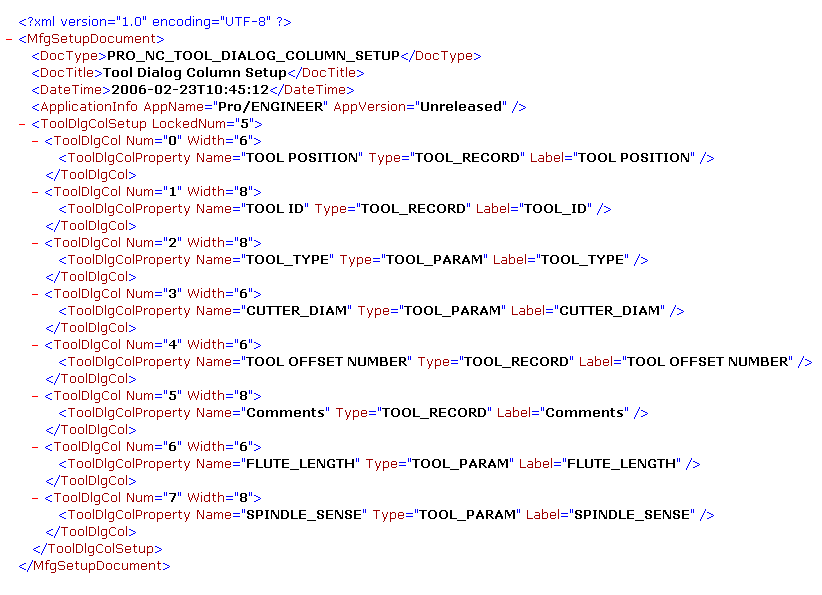
The mfg_session_setup.xml file contains the list of tool parameter columns currently used in the Tools Setup dialog box. For subsequent changes that you make in the Column Setup Builder dialog box to be saved to the tool dialog setup file, you must click  in the Column Setup Builder dialog box.
in the Column Setup Builder dialog box. | If the tool_dialog_setup_file.xml pre-exists in the current working directory or in the location specified by the mfg_setup_dir configuration option, Creo NC reads and uses this file as the tool dialog setup file. When you save the tool dialog setup, all information is saved in the mfg_session_setup.xml file. Subsequent changes are saved in mfg_session_setup.xml file only and the tool_dialog_setup_file.xml file is ignored. If the tool_dialog_setup_file.xml file is absent, all information is saved in the mfg_session_setup.xml file when you save the tool dialog setup. |
The following is an example of the mfg_session_setup.xml file, which contains the list of tool parameter columns: