Calculating BOM Quantity for Terminators
The Bill of Materials (BOM) quantity for terminators is calculated to ensure accurate inventory and reporting. The calculation logic is designed to prevent double-counting and to reflect the true usage of terminators across complex assembly hierarchies.
The BOM quantity for each terminator is determined by:
• Summing occurrences of the terminator in connectors within the assembly.
• Subtracting BOM quantities of any identical terminators that reference the same Cabling Data Object and are present in lower levels of the assembly hierarchy.
This ensures that only unique instances are counted, and duplicate references in subassemblies do not inflate the BOM.
Use Cases
Top-Level Assembly
• Scenario—The top assembly contains multiple harnesses and connectors, each with terminators.
• Calculation—BOM for a terminator is the total number of times it appears in connectors, minus identical terminators in lower-level harnesses referencing the same Cabling Data Object.
• Example:
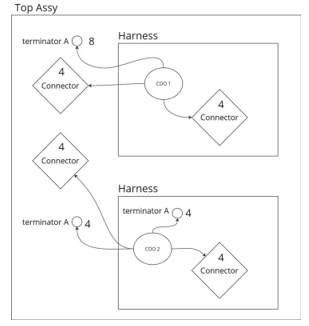
Assembly Level | Connector Occurrences | BOM Quantity |
|---|---|---|
Top Assembly | 16 | 16 |
Harness 1 | 0 | 0 |
Harness 2 | 4 | 4 |
Feature Info BOM Calculation
• Scenario—Calculating BOM for a specific terminator.
• Calculation—Feature Info BOM is the sum of occurrences in connectors, minus identical terminators referencing the same Cabling Data Object in lower levels.
• Example:
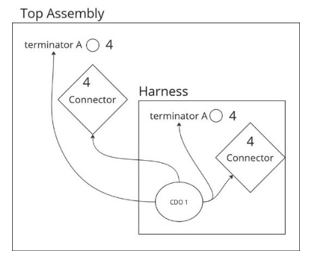
Location | Feature Info BOM |
|---|---|
terminator A from Top Assembly | 4 |
terminator A from Harness 1 | 4 |
Top Assembly BOM | 8 |
Harness BOM | 4 |
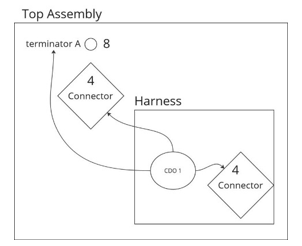
Calculating BOM Top to Bottom
• Scenario—No identical terminators in lower levels reference the same Cabling Data Object.
• Calculation—BOM quantity is calculated from the top assembly down to lower levels, ensuring each unique instance is counted only once.
Multiple Identical Terminators at Same Level
• Scenario—Multiple identical terminators reference the same Cabling Data Object at the same assembly level.
• Calculation—Only the first instance counts toward BOM; subsequent identical terminators at the same level show a BOM quantity of zero.
• Example:
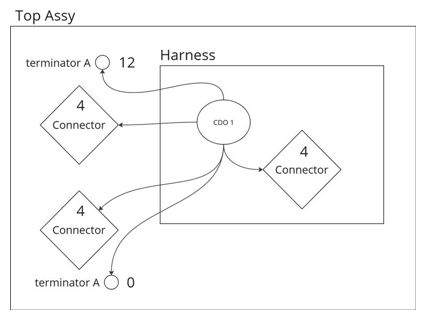
Assembly Level | Connector Occurrences | BOM Quantity |
|---|---|---|
Top Assembly | 12 | 12 |
Harness | 4 | 0 |
Second Instance | 0 | 0 |
Scenarios Resulting in BOM Quantity Zero
• If a terminator is placed in a subassembly or sub-harness in the same hierarchy as the Cabling Data Object but not in the same assembly, BOM quantity is zero.
• If a terminator references a Cabling Data Object in a harness assembly and the connector is external in an upper level assembly, BOM quantity is zero.
Exporting BOM in Mixed Mode
• Scenario—When exporting a BOM in mixed mode.
• Behavior—Terminator features will not show in the items list at the bottom. This is expected.