Importing a STEP Assembly into a Creo Multibody Part
User Interface Location: Click > > >
Videos
Description
Creo Parametric 12.4.0.0 has improved the import of STEP files into . When you import a STEP file, Creo Parametric determines the correct model type for the import file, when the choices are Part or Assembly.
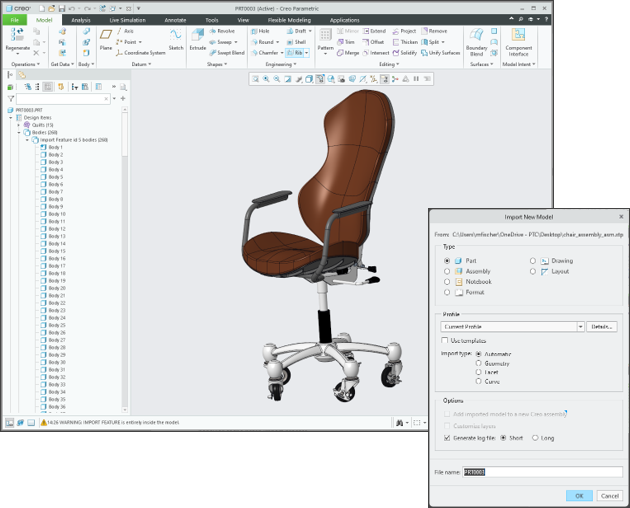
• STEP Assembly – The default model type is set to Assembly; however, you can change the type to Part. When the model type is set to Assembly, a new assembly is created with the defined assembly structure and components displayed in the graphics window and listed in the model tree. If you select the model type to be Part, a new multibody part is created with a defined body for each assembly component.
The following image shows the Import New Model dialog box for a STEP assembly, and the import result.

A new configuration option has been created to control the default model type: step_assembly_import_type — assembly*, part.
• STEP Part – The default model type is set to Part. The Assembly type is not available unless the STEP part file is a multibody part. If the STEP part is a multibody part, the default model type changes to Assembly and the bodies are exploded into a flat subassembly structure. If you set the model type to Part, the multibody STEP part is imported as a true multibody part.
The following image shows the Import New Model dialog box for a STEP part, and the import result.
A new configuration option has been created to control the model type for a multibody STEP part: step_multibody_part_import_type — assembly*, part.
STEP assemblies containing multi-body parts can now be maintained through a new STEP import profile option. You can set this option during the import operation. Go to > and select Maintain multibody structure of assembly components.
When Maintain multibody structure of assembly components is selected and the model type is set to Assembly, the multibody components defined in the STEP assembly are imported as multibody components. When the Maintain multibody structure of assembly components checkbox is cleared, multibody parts are exploded into flat subassemblies within the assembly. This option is disabled by default. If you enable it, the import model will be a component or subassembly of the new assembly.
A new configuration option has been created to control this option: step_add_import_model_to_asm — yes. no*.
Benefits
Importing a STEP assembly as a multibody part improves the behavior when importing a STEP file into , allowing you to control import preferences to achieve the desired file structure. The process enables you to preserve multibodies that are contained in a STEP assembly or part during the import. This new ability improves interoperability between different CAD systems and when using STEP.
Additional Information
Tips: | None. |
Limitations: | No known limitations. |
Does this replace existing functionality? | No. |
Configuration option associated with this functionality: | step_multibody_part_import_type — assembly*, part Sets the default import model type when opening a STEP multibody part. step_assembly_import_type — assembly*, part Sets the default import model type when opening a STEP multibody part. step_add_import_model_to_asm — yes, no* Sets the default import model type when opening a STEP assembly. |