Creo Ansys Simulation: Global Results
Creo Parametric 12.4.0.0
User Interface Location:
When working in Creo Ansys Simulation( > ), global results are available under the Results node on the Model Tree.

Videos
Description
Basic results are removed from the Model Tree and replaced by global results that are available in the Model Tree when you run a study. The global results legend is similar to Creo Simulation Live. Most common types of results are available and can be viewed along with their sub-types.

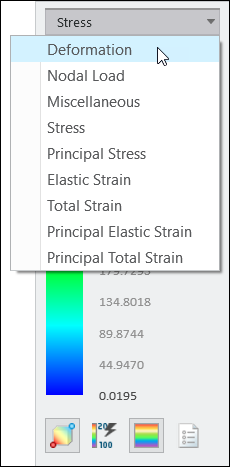
User-defined results are still supported for results other than the Global Results. The option ‘Solve for all result types’ has been removed All modes are shown in the result legend for modal studies. Global results can also be viewed in the auxiliary window. Results created in previous Creo releases must be updated and can then be activated.
Benefits
This enhancement provides the following benefits:
• Ease of use with fast results.
• Saves time that was spent in creating results.
• Consistent results legend for both Creo Ansys Simulation and Creo Simulation Live.
Additional Information
Tips: | None. |
Limitations: | No known limitations. |
Does this replace existing functionality? | Yes—Basic results are no longer available for Creo Ansys Simulation. Global results include all results that were previously available as basic results, as well as many of the commonly used advanced results. Advanced results are replaced by user-defined results. |
Configuration option associated with this functionality: | None. |