To Create a Curve on Surface (COS) by Drop
Use the  Drop Curve tool to create a curve on surface by projecting existing curves or edges onto one or more surfaces, datum planes, intent surface, or quilts.
Drop Curve tool to create a curve on surface by projecting existing curves or edges onto one or more surfaces, datum planes, intent surface, or quilts.1. Click  Style > Drop Curve. The Drop Curve tab opens.
Style > Drop Curve. The Drop Curve tab opens.2. Click the  Chains collector, and then select one or more curves or edges to drop. You can also use the Chains collector on the References tab.
Chains collector, and then select one or more curves or edges to drop. You can also use the Chains collector on the References tab. | The curves can either be internal or external to the current Style feature. |
3. Click the  Surfaces collector, and then select one or more surfaces, datum planes, intent surfaces, quilts, or bodies on which to drop the curve. You can also use the Surfaces collector on the References tab.
Surfaces collector, and then select one or more surfaces, datum planes, intent surfaces, quilts, or bodies on which to drop the curve. You can also use the Surfaces collector on the References tab.| | The surfaces can either be internal or external to the current Style feature. |
4. To define the direction to project the chains, select an option:
◦ To project the curves or edges perpendicularly (normal) to the selected surfaces, under Direction, select Normal to surface.
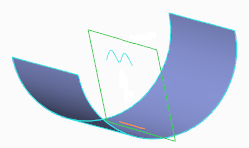
◦ To define the direction to project the chains onto the surfaces by selecting a direction reference:
a. Under Direction, select Along direction.
b. Optionally, to change the drop direction in relation to the selected planar reference, click  , or the click arrows in the graphics window to cycle between the drop directions.
, or the click arrows in the graphics window to cycle between the drop directions.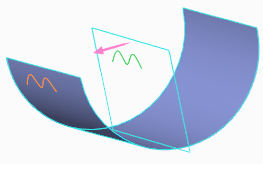
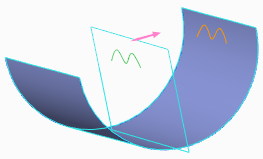
c. Optionally, to select a different planar reference to define the reference direction, click the  Direction plane collector, and select a datum plane, planar surface, or intent plane. You can also use the Direction plane collector on the References tab. The curves are projected onto the surface perpendicularly to the selected plane.
Direction plane collector, and select a datum plane, planar surface, or intent plane. You can also use the Direction plane collector on the References tab. The curves are projected onto the surface perpendicularly to the selected plane.| | By default, the active plane is selected as the direction reference for dropping the curves onto the surface. |
5. To extend the start or end point of the drop curves or edges to the nearest surface boundary, click the Options tab, and then select the Start or End check box.
| | • When you select more than one curve or edge to drop, the start points or end points for all the drop curves or edges extend to the nearest surface boundary. • When you drop curves or edges onto a datum plane, you cannot extend the start or end point. |
6. Click  OK.
OK.
OK.