Local Stock Allowance
In general, the amount of stock left after a rough cut or semi-finish NC sequence is controlled by the following manufacturing parameters: ROUGH_STOCK_ALLOW, PROF_STOCK_ALLOW, and Z_STOCK_ALLOW. They specify the stock allowance for all the surfaces machined in this NC sequence. In some cases, however, you may need to specify a different value of stock allowance for certain surfaces; for example, to leave extra stock for subsequent grinding operations, or adjust stock allowance prior to heat treatment.
This functionality is available for Area, 4 Axis Area, Groove, and Profile Turning.
When creating a Turning sequence, you can specify values for these parameters by selecting relevant parameters in the Edit Parameters dialog box. This dialog box opens when you define the Parameters for the sequence. When working with classic sequences, you can specify local stock allowance by selecting a chain of segments on a Turn Profile and entering a value that will apply to this chain only.
For a Profile Turning sequence, the Stock Allowance value for All Entities in the Profile Turning Cut dialog box at the Tool Motion level applies to all entities of a selected turn profile. To specify local stock allowance for specific entities of the selected turn profile, clear the All Entities checkbox, select the entities, and then specify the offset value for each entity.
Consider the following scenarios for the specified values of STOCK_ALLOW and Z_STOCK_ALLOW in a Profile Turning sequence:
• The specified value of STOCK_ALLOW is 10 and the specified value of Z_STOCK_ALLOW is – (dash) at the sequence level.
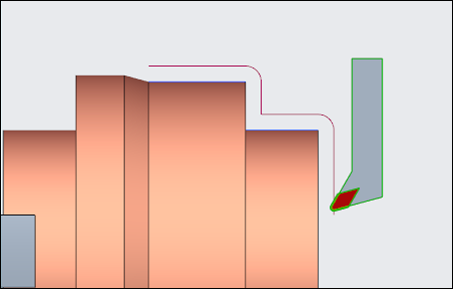
Since the Z_STOCK_ALLOW parameter value is – (dash), the STOCK_ALLOW parameter value is applied along the X-axis and Z-axis.
If the Z_STOCK_ALLOW parameter value is 0 or greater than 0, the STOCK_ALLOW parameter value is applied along the X-axis only.
• The specified value of STOCK_ALLOW is 10 and Z_STOCK_ALLOW is 3 at the sequence level.
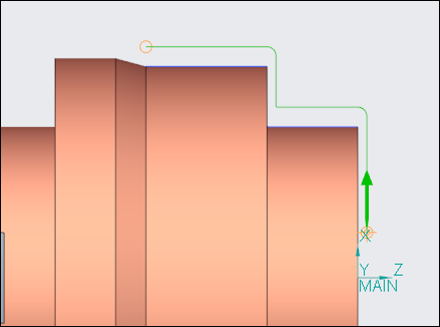
The STOCK_ALLOW parameter value 10 is applied along the X-axis and the Z_STOCK_ALLOW parameter value 3 is applied along the Z-axis.
• The specified value of STOCK_ALLOW is 10 and the specified value of Z_STOCK_ALLOW is 3 at the sequence level. Additionally, the specified Stock Allowance value for All Entities in the Profile Turning Cut dialog box at the Tool Motion level is 2.
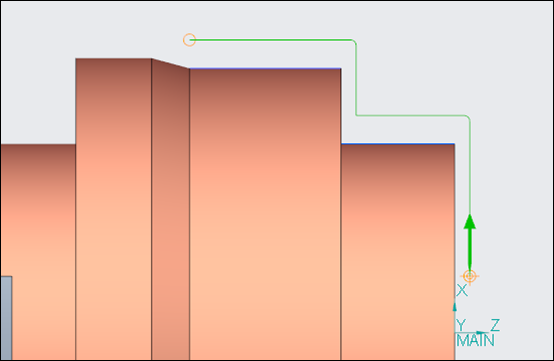
The sum of STOCK_ALLOW parameter value and the Stock Allowance value equal to 12 is applied along the X-axis. The sum of Z_STOCK_ALLOW parameter value and the Stock Allowance value equal to 5 is applied along the Z-axis.
Similar toolpath behavior occurs in Area Turning and Groove Turning sequences when ROUGH_STOCK_ALLOW or PROF_STOCK_ALLOW is defined along with Z_STOCK_ALLOW and local stock allowance for entities.