Modernized 3D Dragger
Creo+
User Interface Location: .
Description
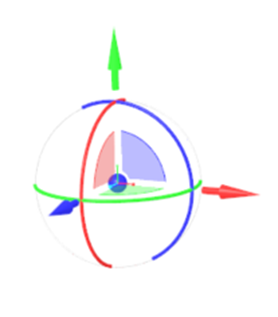
The 3D dragger has been redesigned to improve visual clarity and selection accuracy when manipulating geometry. The updated design enables more accurate selection of components and geometry by reducing accidental picks, improving precision, and maintaining workflow focus.
The improved capabilities include:
• The redesigned dragger presents clearer, more distinct arrows, planar handles, and rotation arcs.
• The updated arrow design and increased spacing between planar surfaces improve pickability.
• Sensitivity zones aligned with the new 3D dragger geometry enable more accurate selection.
In the previous design, it was difficult to reliably select the intended 3D dragger element because the arrows and planar handles were difficult to distinguish, and had overlapping interaction zones.


Benefits
Streamlines workflows by enabling faster and more intuitive geometry manipulation.
Additional Information
Tips: | None. |
Limitations: | The legacy dragger may continue to be used in some workflows, such as Scale in Freestyle, Volume Helical Sweep, and Edit Position in Assembly. |
Does this replace existing functionality? | No. |
Configuration option associated with this functionality: | None. |