Creo+ Launcher Improvements
Creo+
Videos
Description
• The Creo+ launcher dialog accessed through the desktop icon has improved for the cases where a user is a member of multiple profiles.
• The launcher dialog displays all the profiles for a user and when selected starts Creo+ with the selected profile

• A new option has been introduced in the launcher to disable the dialog if checked, thus, automatically starting Creo+ with the previously selected profile.
• A new option in the PTC Control Center under Options allows the user to always show the profile selection dialog if enabled.
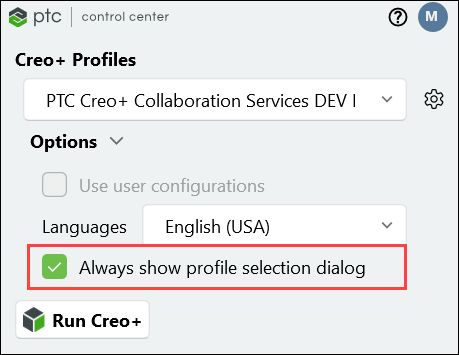
• Users can now select and create a desktop shortcut for a selected profile from the PTC Control Center.

• A new shortcut with a Creo+ icon is created on the user’s desktop. The shortcut allows the user to run Creo+ with that profile.
Benefits
• Improved access to selected Creo+ profiles when users are assigned to multiple profiles.
• Reduces the need to always choose the required profile when starting Creo+ from the desktop icon.
Additional Information
Tips: | None. |
Limitations: | No known limitations. |
Does this replace existing functionality? | No. |
Configuration option associated with this functionality: | None. |