EZ Tolerance Analysis Enhancement: Redefine Mating Features for Existing Stackups
Creo+
User Interface Location: In the EZ Tolerance tab:
1. Click Stackup Table. The EZ Tolerance Analysis dialog box opens.
2. Click  in front of a stackup. The details of the stackup appear.
in front of a stackup. The details of the stackup appear.3. Right-click a mating feature. The  Edit Definition command is available in the shortcut menu.
Edit Definition command is available in the shortcut menu.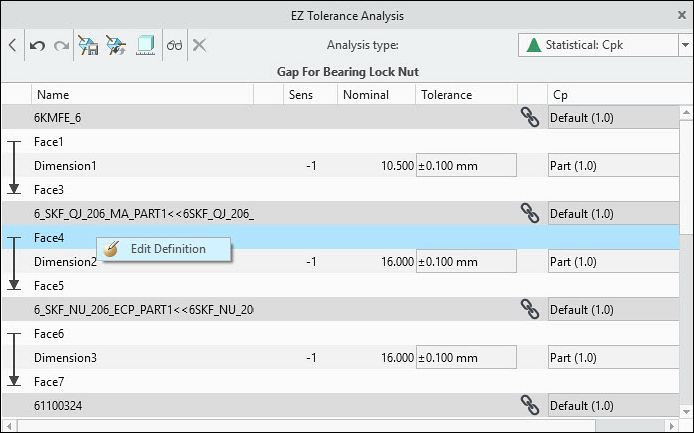
Videos
Description
You can now replace a mating feature in an existing stackup with a different one.
Previously, you could not change mating features after creating a stackup. To use different mating features, you had to recreate the stackup. Now, you can redefine a mating feature in an existing stackup and select a different one. This makes it easier to update design intent without recreating the stackup from scratch.
Benefits
This enhancement eliminates repetitive work by allowing you to redefine mating features in existing stackups.
Additional Information
Tips: | If a stackup uses a pair of mating features, redefine each mating feature separately. |
Limitations: | No known limitations. |
Does this replace existing functionality? | No. |
Configuration option associated with this functionality: | None. |