Expert Mold Base Design Integration with Creo+
Creo+
User Interface Location: EMX can be accessed from the following locations:
• Part and Assembly Mode—EMX can be accessed through the Application tab under the Engineering subgroup.
Drawing Mode—EMX can be accessed through the Tools tab under the Applications sub-group.
Mold Manufacturing Mode—EMX can be accessed through the Applications tab under the Mold Assembly sub-group.
Stand-by Mode—EMX can be accessed through the Applications sub-group.

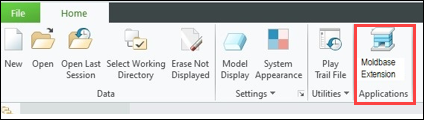
Description
The Expert Moldbase Extension (EMX) and Smart Hole Chart (SHC) extensions are now supported with Creo and installed on-demand through the Applications tab.
Users no longer need to download and install EMX separately as a post-Creo install operation.
The EMX and SHC help centers are also integrated into the Creo help center.
Benefits
• The EMX and SHC modules are a part of the Creo+ deployment for users with EMX license entitlements.
• Provides an improved user experience and minimizes administration burden.
• You can also browse relevant content in the Creo help center.
Additional Information
Tips: | None. |
Limitations: | No known limitations. |
Does this replace existing functionality? | Yes. The Expert Moldbase Extension (EMX) and Smart Hole Chart (SHC) extensions are now modules in Creo. |
Configuration option associated with this functionality: | None. |