Search Tool Support for Selecting Surfaces Linked to Pattern Features
Creo+
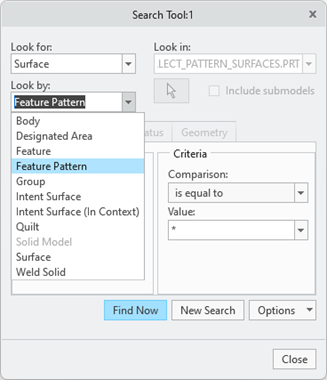
User Interface Location: >  Find. The Search Tool dialog box opens.
Find. The Search Tool dialog box opens.• Select Surface from the Look for list.
• Select Feature Pattern from the Look by list.
Videos
If the video does not play, watch it on YouTube.
Description
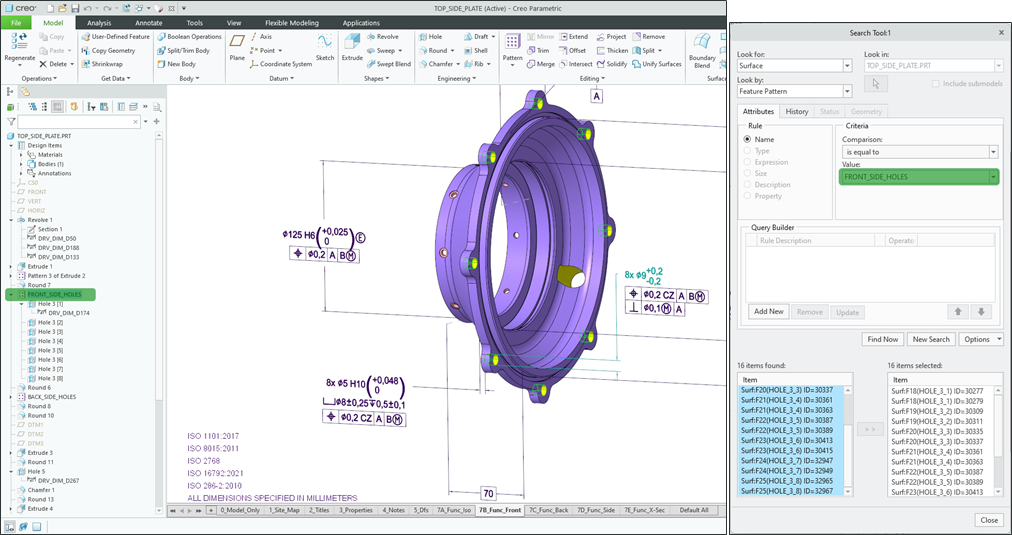
This enhancement supports a new search tool query that enables the collection of all surfaces associated with a pattern feature. This query is enabled using the following search attributes:
• Look For: Surface
• Look By: Feature Pattern
The feature patterns can be identified either by their ID or by user-defined names. Additionally, the query can be saved to a Datum Reference Feature (DRF) using the Save Query to Feature option. Upon regeneration, the query results are automatically updated within the DRF, which can serve as an input for downstream features, such as annotations for MBD.
Benefits
Less time spent on manual selection of surfaces belonging to a pattern.
Additional Information
Tips: | None. |
Limitations: | The following patterns are not supported by this enhancement: • Multi-hole features created with a sketched placement • Pattern recognition feature • Pattern of assembly-level cut features • Pattern of components For the first three points, the intent surface object generated by these features can be used directly. |
Does this replace existing functionality? | No. |
Configuration option associated with this functionality: | None. |