Offset Chain Enhancements
Creo+
User Interface Location: Click >  Offset >
  Chain.
Offset > Chain.Description
In Offset Chain, the user interface logic is enhanced in several ways for better reference handling and feature workflows:
1. When changing the offset chain/curve, the reference surface collector is auto-populated. If the previously selected surface reference is still valid, it takes priority and will no longer be overwritten. This applies to the  Along Surface and
  Normal to Surface options and is also enabled for external references chains in assemblies.
Along Surface and Normal to Surface options and is also enabled for external references chains in assemblies.2. The reference surfaces are checked, and they are invalidated in the following situations:
◦ The selected chain does not lie on the quilt or body containing the surface (when the Along Surface offset option is used)
Along Surface offset option is used)◦ The selected curve does not lie on the reference surface (when the Normal to Surface offset option is used)
Normal to Surface offset option is used)The reference surface status is indicated more visibly with a red or yellow dot in the collector and in a What's wrong message.
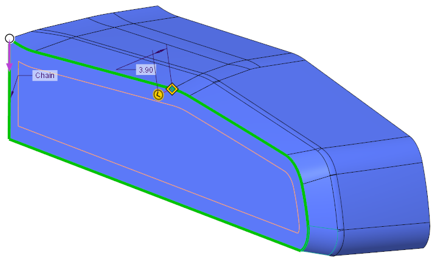
Offsetting a chain on a surface:
 |  |
Previously, surface references might have gotten overwritten inadvertently when selecting new chain references.
Benefits
Increased usability through better reference handling, and guidance in the user interface
Additional Information
Tips: | None. |
Limitations: | No known limitations. |
Does this replace existing functionality? | No. |
Configuration option associated with this functionality: | None. |