Enclosure Volume: Optimization Constraints
Creo+
User Interface Location:
• In a part, click > >  Enclosure Volume.
Enclosure Volume.• In an assembly, click > > > Enclosure Volume.
Enclosure Volume.
Videos
Description
The Enclosure Volume feature has been enhanced to broaden the support for use cases related to bounding box calculation.
The following new capabilities have been added:
• Additional optimization constraint
◦ Ability to specify a plane or planar surface (or in general, a normal orientation) that constrains the optimization, so that one side of the resulting bounding box coincides with that plane or is normal to the selected orientation, respectively.
This can be beneficial to more easily find the minimal bounding box, given a pre-defined orientation, for example, the model standing on the floor.
◦ Ability to align the x- and y-dimension parameters with the selected direction reference.
Previously, the Enclosure Volume feature did not support additional constraints for the optimization calculation.
• Template part support
You can now create a successful Enclosure Volume feature for an empty part if the Create box geometry check box is not selected and the box dimensions evaluate to 0. This allows you to define the Enclosure Volume feature in a template part that does not contain solid geometry, without failing regeneration.
Optimized orientation: | Optimized orientation with additional orientation constraint: |
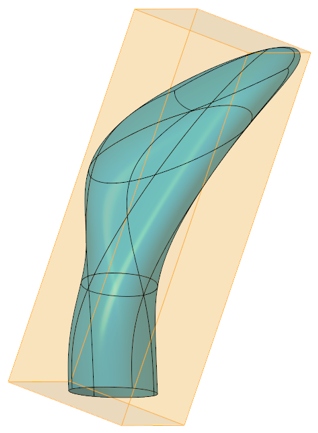 |  |
 | • The calculation of the optimized bounding box will typically be faster with an additional constraint specified. • In some cases, parallel directions can yield a slightly different bounding box result. |
Benefits
Optimized process support related to bounding box calculations for various use cases such as packaging optimization
Additional Information
Tips: | None. |
Limitations: | No known limitations. |
Does this replace existing functionality? | No. |
Configuration option associated with this functionality: | None. |