Performance Report Usability Improvements
Creo+
User Interface Location: Click > >  Performance Report.
Performance Report.Description
The new enhancements include more details in the regeneration report and better usability, including:
• A cleaner start page.
• The Performance Report dialog box no longer blocks selection of Model Tree objects.
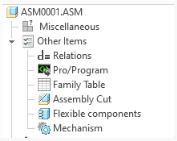
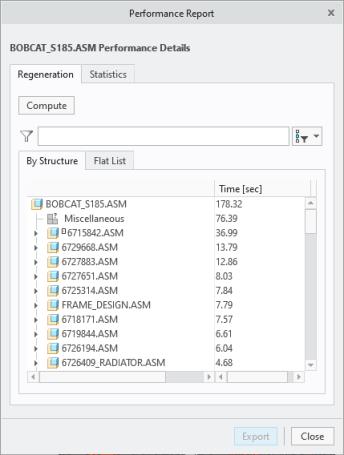
• Regeneration Preparation is replaced by Miscellaneous and Other Items nodes in the report.
◦ Miscellaneous—Represents regeneration related time that is not accounted for by specific objects.
◦ Other Items—Includes the regeneration times of the following items for each component: Relations, Pro/Program, Family Tables, Assembly Cuts, Flexible Components, and Mechanism.
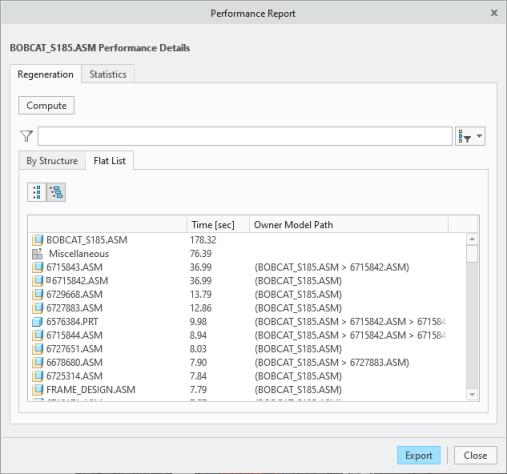
• A new column was added in the flat list, indicating the owner model path.
• Object selection is now consistent for the By Structure and Flat List tabs.
The By Structure tab is shown in the figure below.
The Flat List tab is shown in the figure below.
• The search is more aligned with the Model Tree search and allows to both highlight and filter the list.
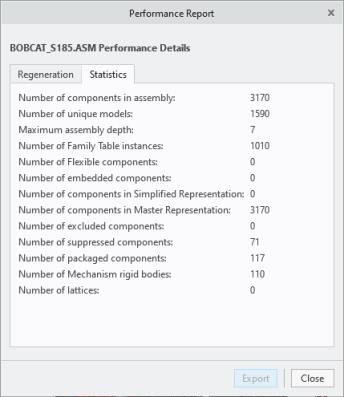
• The Statistics tab, as shown in the figure below, contains the number of features.
Benefits
The enhanced performance reporting tool allows you to better assess a model’s regeneration performance and find potential bottle necks in a design more easily and with more detail.
Additional Information
Tips: | None. |
Limitations: | • Regeneration times are system dependent and will vary depending on other running processes. • Multiple occurrences of the same component are all added to the respective assembly total. This can give an inaccurate result for the regeneration report of that assembly. • Simplified representations are not fully supported. • Mechanism assemblies do not regenerate until there is a change in the assembly. |
Does this replace existing functionality? | No. |
Configuration option associated with this functionality: | None. |