Geometry Checking Feedback for Meshing in Creo Ansys Simulation
Creo+
User Interface Location: You can access the Troubleshooter dialog box from the following locations:
• From the Ansys Simulation tab, click Run  > .
> .
> .• From the Process Manager, click  to view the active process from the Process Manager.
to view the active process from the Process Manager.Click  and then select Troubleshooter.
and then select Troubleshooter.Videos
If the video does not play, watch it on YouTube.
Description
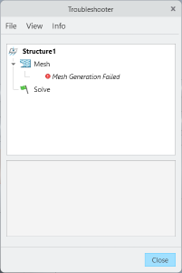
Creo Ansys Simulation now supports a troubleshooter when geometry issues result in a failed mesh. Previously this information was not available. The troubleshooter lists the surfaces where the mesh has failed as shown in the following figure:
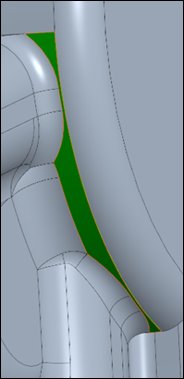
Selecting the Mesh list item results in the surface highlighting and zooming into this area in the Graphics Window as shown in the following figure:
The troubleshooter will be used in future for error, warning, and information messages.
Benefits
This enhancement provides the following benefits:
• Identifies areas of the model that are problematic
• Provides instant feedback to the user
• Consistent troubleshooter
Additional Information
Tips: | None. |
Limitations: | No known limitations. |
Does this replace existing functionality? | No. |
Configuration option associated with this functionality: | None. |