Extend Ply Boundary by Contour
1. Select a ply to extend.
2. Click >  Extend Ply. The Trim/Extend Ply tab opens. The boundary of the laminate object is highlighted in the graphics window.
Extend Ply. The Trim/Extend Ply tab opens. The boundary of the laminate object is highlighted in the graphics window.3. Under Method, select  By Contour.
By Contour.4. In the Boundary chains collector, select chains to define an extended boundary of the ply. You can define the boundary by selecting a single closed loop, one outer and one or more inner loops, multiple individual loops, or multiple intersecting curves, edges, or loops. Make sure that each loop is either adjacent to or intersects the ply boundary.
5. To invert the selection, use Flip Side. The highlighted area defines a new boundary for the ply.
6. Click  OK.
OK.
OK.Examples—Extend by Contour
Some examples of valid extension are as follows:
• The extension contour is a closed chain adjacent to the ply boundary.
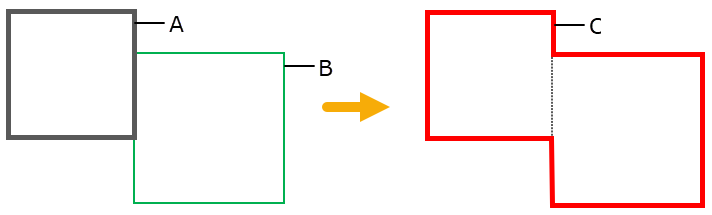
◦ A—Original ply boundary
◦ B—Extension contour
◦ C—Extended ply boundary
• The extension contour is a closed chain that intersects the ply boundary.
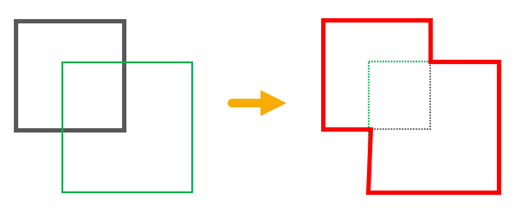
• The extension contour is an open chain that intersects the ply boundary.
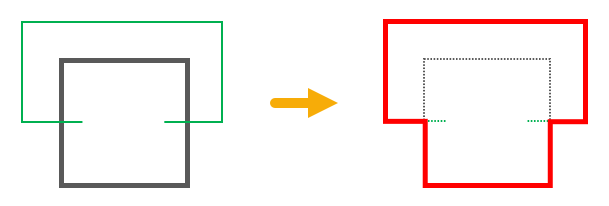
• The extension contour is entirely inside the inner loop of the ply boundary.
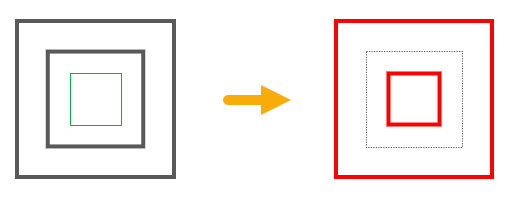
• The extension contour encloses the ply boundary.
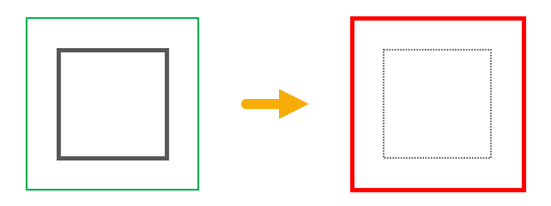
An example of an invalid extension is as follows:
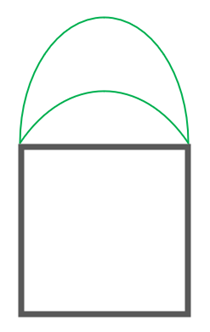
• An extension contour cannot be a closed loop that meets at two vertices of the ply boundary. However, edges of the loop can be used along with the ply boundary to form a closed loop.