ドレーピングされたプライのフラットパターンのエクスポート
1. >  「フラットパターンをエクスポート」(Export Flat Pattern) の順にクリックします。「フラットパターンをエクスポート」(Export Flat Pattern) ダイアログボックスが開きます。
「フラットパターンをエクスポート」(Export Flat Pattern) の順にクリックします。「フラットパターンをエクスポート」(Export Flat Pattern) ダイアログボックスが開きます。2. 「ファイルあたりのプライ」(Plies Per File) で、「すべてのプライを同じファイルにエクスポート」(Export all plies to the same file) を選択します。
3. 「ファイルでのプライの配置」(Plies Placement in the File) で、「プライを互いにオフセットして配置」(Place plies with an offset from each other) を選択します。
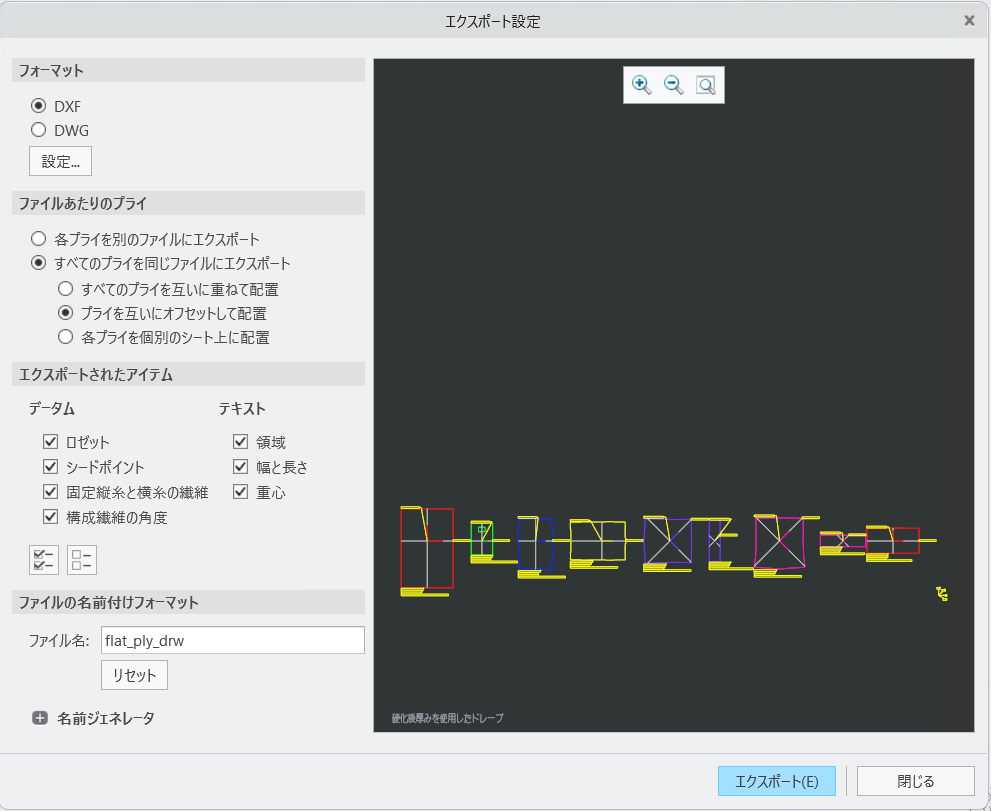
4. 「エクスポート」(Export) をクリックします。「コピーを保存」(Save a Copy) ダイアログボックスが開きます。
5. 「OK」をクリックします。flat_ply_drw.dxf ファイルがワーキングディレクトリに作成されます。