PID 控制器練習 2 - 建立邊界條件
1. 在「域」(Domains) 下,以滑鼠右鍵按一下 PIPE_Body_1 並選取  「新增邊界條件」(Add Boundary Condition)。「曲面集合」(Surface Sets) 對話方塊就會開啟。
「新增邊界條件」(Add Boundary Condition)。「曲面集合」(Surface Sets) 對話方塊就會開啟。2. 選取與 pipe_cold_inlet 對應的曲面,如下圖所示。
圖 4. 邊界曲面
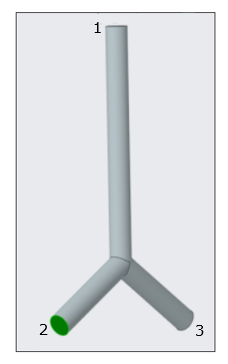
1. pipe_outlet
2. pipe_cold_inlet
3. pipe_hot_inlet
3. 按一下「確定」(OK)。將在「一般邊界」(General Boundaries) 底下建立一個新圖元 BC_0001。
4. 在「域」(Domains) 下,以滑鼠右鍵按一下 PIPE_Body_1 並選取 「新增邊界條件」(Add Boundary Condition)。「曲面集合」(Surface Sets) 對話方塊就會開啟。
「新增邊界條件」(Add Boundary Condition)。「曲面集合」(Surface Sets) 對話方塊就會開啟。5. 選取與 pipe_hot_inlet 對應的曲面,如上圖所示。
6. 按一下「確定」(OK)。將在「一般邊界」(General Boundaries) 底下建立一個新圖元 BC_0002。
7. 在「域」(Domains) 下,以滑鼠右鍵按一下 PIPE_Body_1 並選取 「新增邊界條件」(Add Boundary Condition)。「曲面集合」(Surface Sets) 對話方塊就會開啟。
「新增邊界條件」(Add Boundary Condition)。「曲面集合」(Surface Sets) 對話方塊就會開啟。8. 選取與 pipe_outlet 對應的曲面,如上圖所示。
9. 按一下「確定」(OK)。將在「一般邊界」(General Boundaries) 底下建立一個新圖元 BC_0003。
10. 按一下滑鼠右鍵,並重新命名下列邊界條件:
◦ BC_0001 作爲 pipe_cold_inlet
◦ BC_0002 作爲 pipe_hot_inlet
◦ BC_0003 作爲 pipe_outlet