在 Windows Server OS 上安裝 PTC Control Center
在執行 Windows Server OS 的電腦上安裝 PTC Control Center 時,您需要編輯「關閉 Windows Installer」(Turn off Windows Installer) 群組原則。執行下列步驟:
1. 從「控制台」導覽至 > 以開啟「本機群組原則編輯器」(Local Group Policy Editor) 視窗。
2. 導覽至「本機電腦原則」(Local Computer Policy)「電腦設定」(Computer Configuration)「系統管理範本」(Administrative Templates)「Windows 元件」(Windows Components)Windows Installer。
3. 選取「關閉 Windows Installer」(Turn off Windows Installer) 設定,然後按一下「編輯原則設定」(Edit policy setting)。
4. 選取「已啟用」(Enabled) 單選按鈕。
5. 在「選項」(Options) 方塊中,從清單中選取「永不停用」(Never)。
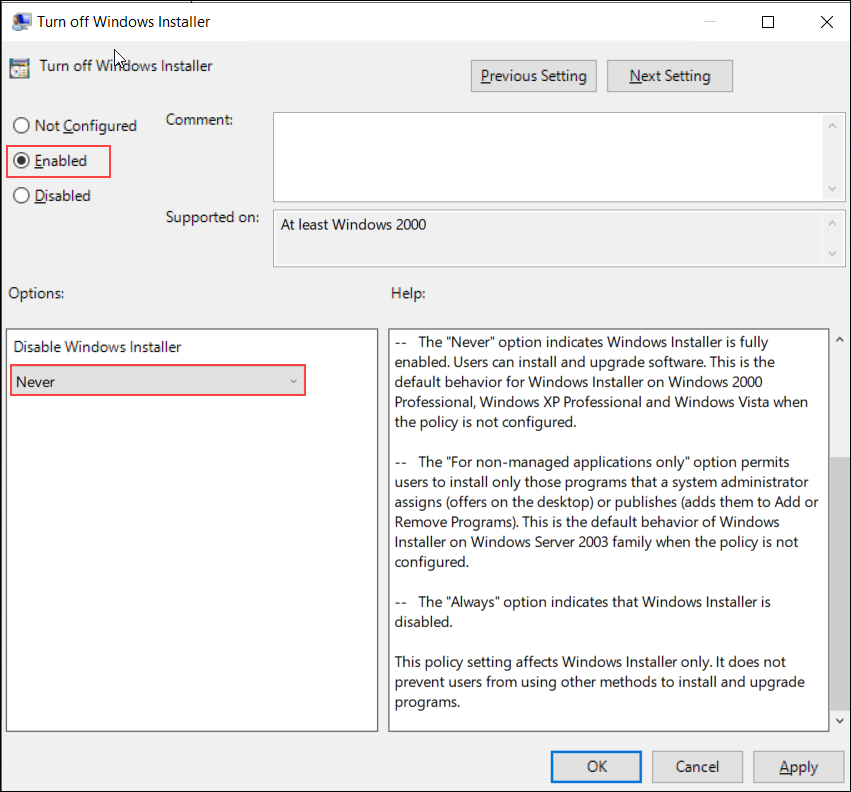
6. 按一下「確定」(OK),儲存原則設定的變更。
7. 現在,您可以繼續安裝 PTC Control Center 安裝程式 PTCControlCenter.msi。