Activate, deactivate, or delete relations
Any of the relations within a relation set can be activated or deactivated at any time. When deactivated, a relation remains within its relation set, but takes no part in the solution next time the relation set is solved.
To quickly activate or deactivate a relation, select or deselect it in the Relation Detail Browser. The third and fourth relations are deactivated here:
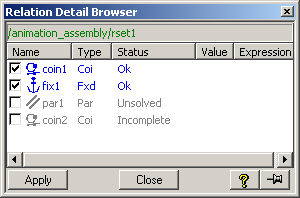
A deactivated relation is indicated by grey text and Unsolved status in the Relations browser. A relation deactivated by the system because of a missing reference element is indicated as Incomplete in the Status column, as shown above.
To activate, deactivate, or delete a relation,
1. Click Relations and then, in the Relations Mode group, click  Assembly or
  Parametrics.
Assembly or Parametrics.2. Click Relations and then, in the Create & Modify group, click  Act/Deact or
  Delete in the Edit section.
Act/Deact or Delete in the Edit section.3. Double-click the relation in the Structure Browser.
4. Click OK to complete the operation.
to complete the operation.