Example: Creating a new part by sweeping
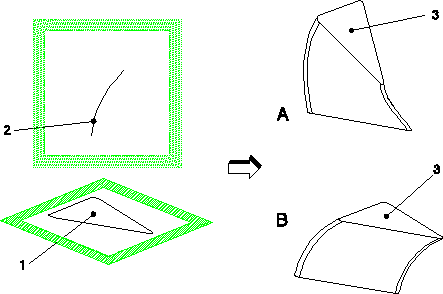
In this example, you will create a new part by sweeping a profile 1 along a path defined by a spine curve 2. The orientation of the end face 3 of the newly created part depends on which of the following control modes you select for the sweep operation:
• By Spine (A)
• Constant (B)
Example: Creating a New Part by Sweeping
 | Please note that the by Face control mode does not apply in this example because this mode requires an existing part to provide faces and edges. |
After creating the workplanes, the profile, and the spine:
1. Click Modeling and then, in the Model group, click More.
2. Click  Sweep Add in Basic Sweep section. The Sweep Add dialog box opens.
Sweep Add in Basic Sweep section. The Sweep Add dialog box opens.3. Enter the name of the new part.
4. Select the workplane containing the profile (1).
5. Select the spine (2).
6. In the Control box, select by Spine to make the profile normal follow the spine (A) or select Constant to keep the swept profile parallel to the original profile (B).
7. To preview the new part, click Preview.
8. Click  to complete the operation.
to complete the operation.