Mill a shaft for DIN 5481
Automatically mill a DIN 5481 serrated tooth shaft.
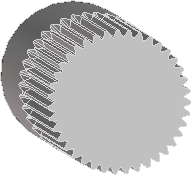
To mill a shaft for DIN 5481,
1. Create a workplane on the end face of the shaft part. You may find it easier to center the milling profile if you place construction lines, like this:

2. Click Part Library and then, in the Shaft/Hub group, click the arrow next to  Spline sh.
Spline sh.3. Click  Mill DIN 5481. The Milling DIN ISO 5481 dialog box opens.
Mill DIN 5481. The Milling DIN ISO 5481 dialog box opens.4. Click Short symbol and select the dimensions for the milling. The remaining values will be automatically populated, but you may change them if desired.
5. Click Center and select the hub center in the viewport.
6. Select a Direction in the viewport.
7. Click OK  to complete the operation.
to complete the operation.The Length is the usable length of the tooth grooves, shown here:

Limitations
• You must start with a shaft diameter that is appropriate for the milling operation. The shaft is not automatically adjusted for the outer diameter of the teeth.