Create a cable channel by bridged curve
Before you can autoroute cables, you must prepare a path for them. With the Bridge Curve command, you can route the channel between two existing channel segments.
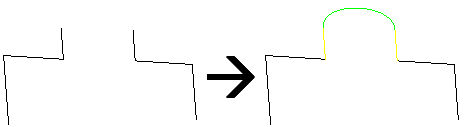
To bridge two channel segments,
1. Click Channel and then, in the Modify group, click the arrow next to  Add edge.
Add edge.2. Click Bridge Curve. The Bridge Curve dialog box opens.
Bridge Curve. The Bridge Curve dialog box opens.3. Select the first segment to bridge. If necessary, adjust the tangent length with the TangLen box.
4. Select the second segment to bridge. If necessary, adjust the tangent length with the TangLen box.
 | Connecting to the wrong end? Where you click the edge matters. This command takes the closest end to the selection point. |
5. Click Next to bridge other segments, or click  to complete the operation.
to complete the operation.